QRishing 101: How to Spot a Malicious QR Code (2026)
What QRishing Actually Is
QRishing — a portmanteau of "QR" and "phishing" — is the practice of tricking someone into scanning a QR code that leads to a credential-stealing page, a drive-by malware download, a fake payment form, or a permission-prompt that hijacks an account. It is not a new class of attack, exactly; it is phishing with the URL hidden inside a black-and-white square so the victim cannot read it before tapping.
The technique works because of a single asymmetry. A printed link gives you a chance to scan the domain with your eyes. A QR code does not. By the time your phone surfaces the destination, your thumb is already over the "Open" button and a tab is loading. The FBI Internet Crime Complaint Center issued a public service announcement flagging exactly this pattern after a wave of fake parking and toll-payment codes appeared across the United States. The advisory remains a useful reference: criminals are not breaking the QR specification, they are exploiting the trust users place in the medium.
This guide covers the attack vectors that matter in 2026, a concrete inspection checklist before you tap a preview, the right incident response if you scanned the wrong thing, and why the structure of dynamic QR codes — managed through a dashboard like /dash — defeats the most common physical attack: the sticker swap.
Five Attack Vectors You Will Actually Encounter
The patterns below are what payment-security teams and municipal IT staff report most often. They are not exotic — they are mundane, which is what makes them work.
1. Parking-meter and parking-lot sticker swaps
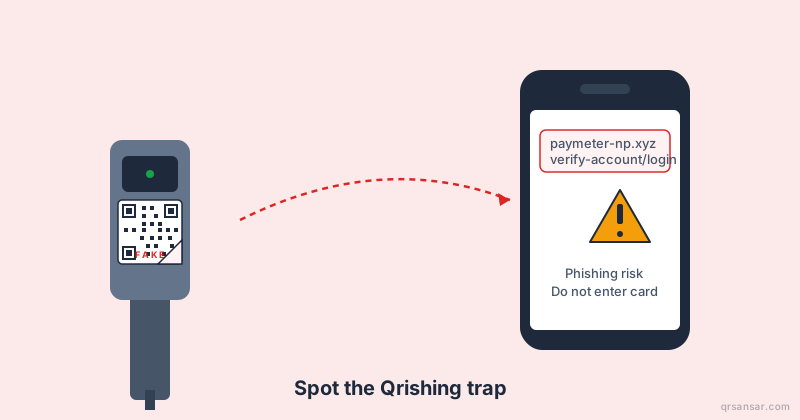
A genuine "Pay by QR" decal exists on a meter or a kiosk. The attacker prints a same-size sticker pointing to a clone of the parking app, peels the manufacturer's sticker partially or covers it entirely, and walks away. Victims enter a card number and CVV on what looks like the city's payment portal. Several US cities — Austin, San Antonio, Houston — confirmed exactly this pattern in 2022 and 2023, and the FBI advisory cited above was written in response.
2. Restaurant table-tent replacements
Cafes and bars often place a small printed card on each table linking to a menu. Because table-tents are cheap and unprotected, anyone can drop a replacement during a normal visit. The fake menu site asks for "age verification" or a "loyalty signup" and harvests email and password — a credential combination most people unfortunately reuse on banks.
3. EV-charger overlays
This is the highest-value variant currently in circulation in Europe and increasingly in Asia. EV charging stations frequently use a QR code to initiate a session, often via a third-party roaming app. A small adhesive overlay leads the driver to a near-identical-looking page that captures payment-card data and sometimes a CVV. Charging never starts; the driver eventually moves to another stall and forgets about it until the chargeback arrives.
4. Mailed flyers and "missed delivery" cards
Physical mail with a QR code feels more credible than email — it has a stamp, an address, sometimes a logo. Common variants: a fake "USPS missed delivery" card, a "tax refund" letter from a regional revenue authority, a "you have an unpaid toll" notice. The QR leads to a fake portal that collects ID and payment details.
5. Fake invoices in email (the corporate variant)
This is where office IT teams get bitten. An invoice PDF arrives as an attachment, the body of the email looks routine, and instead of a clickable link there is a QR code labeled "Pay invoice." Email security gateways scan the text of links — they typically do not OCR-decode QR codes inside attachments. The QR routes the finance assistant to a fake bank login, or to a Microsoft 365 consent screen that asks for mailbox permissions.
"The QR code is not the vulnerability. The vulnerability is that a printed image bypasses every URL filter you have spent fifteen years deploying — DNS filtering, secure email gateways, browser warnings — until the moment a human points a camera at it."
How to Preview a URL Before You Tap
Both iOS and Android show a preview of the decoded URL before opening it. Train yourself and your team to actually read it.
iOS (Camera app, iOS 17+): The yellow banner at the bottom of the camera viewfinder shows the domain. Tap once to see the full URL in a Safari preview sheet — do not let muscle memory tap "Open" before reading. If you scanned from Control Center's QR scanner, the behavior is identical.
Android (Google Lens / Pixel Camera / Samsung Bixby Vision): A floating chip appears with the domain. On stock Android the preview is brief — long-press to copy the URL without opening, then paste it into a notes app or a URL-inspection service if you have any doubt.
Cross-platform tip: If you are unsure, scan in airplane mode. The decoder still works because it is local. The URL will appear; the page will not load. You can then decide whether to enable networking.
The Red-Flag Checklist
Apply this checklist in the two-second window between scan and tap.
- Is the domain what you expect? A municipal parking app should be a
.govdomain or a known vendor likeparkmobile.io. A bank's QR should be on that bank's apex domain, not a subdomain of a generic SaaS host. - Is there a URL shortener in the chain?
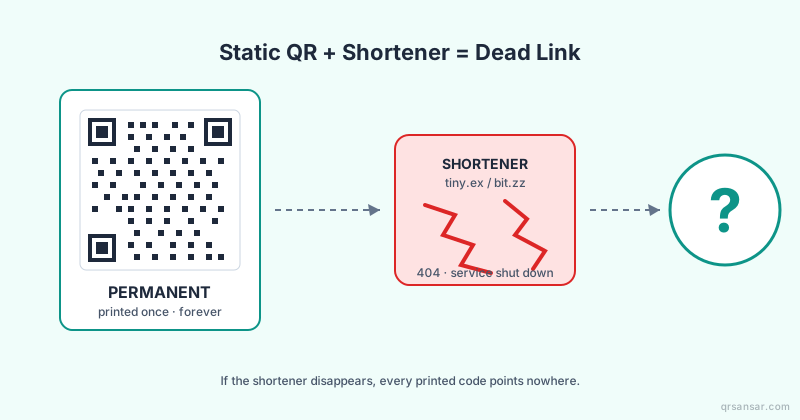
bit.ly,tinyurl.com,t.co,goo.gl(now sunset),cutt.ly,ow.ly— shorteners hide the real destination. A legitimate physical sticker almost never needs one. Read more in our post on why third-party shorteners do not belong in static QR codes. - Lookalike characters? Watch for
paypa1.com(digit one),rnicrosoft.com("r" + "n"), Cyrillicаinstead of Latina. Punycode domains starting withxn--are an immediate stop. - HTTPS without a meaningful certificate. A green padlock alone is not a trust signal — Let's Encrypt issues certificates to phishing sites within minutes. Look at the domain, not the lock.
- Urgency language on the landing page. "Your account will be suspended in 24 hours," "Pay now to avoid towing," "Verify within 1 hour" — urgency is the universal phishing tell.
- Permission requests that do not match the task. A parking-payment site does not need access to your contacts. A menu does not need a Microsoft 365 OAuth scope.
- The sticker looks wrong on the object. Peeling edges, mismatched font weight versus the surrounding signage, a sticker placed over another sticker. Run your thumbnail along the edge — if there is a layer underneath, walk away.
A Comparison Table for Quick Reference
| Signal | Probably Safe | Worth Inspecting | Stop |
|---|---|---|---|
| Domain | parking.cityofx.gov |
parking-cityofx.com |
parking-cityofx.xyz |
| URL length | Short, readable | Medium with query params | Goes through bit.ly/tinyurl |
| Sticker condition | Flush, factory-printed | Slight bubbling | Layer visible underneath |
| Landing page | Branded, matches signage | Generic template | Asks for password + card + ID |
| Asked permissions | None on first load | Optional sign-in | OAuth consent or contacts access |
What to Do If You Scanned a Malicious QR
The first sixty minutes matter most. Work through these steps in order.
- Do not enter any more data. Close the browser tab. If you typed a password, assume it is compromised.
- Revoke active sessions on the affected account. Most services have a "sign out of all devices" option under security settings. Use it before changing the password.
- Change the password and enable a second factor. Use a passkey or hardware key where available. SMS is better than nothing but is itself phishable.
- Check email rules and OAuth grants. If you tapped through a fake Microsoft or Google consent screen, attackers often install a mailbox-forwarding rule or grant themselves a long-lived OAuth token. Audit both.
- Call your card issuer if you entered payment details. Freeze the card and request a new number. Do not wait for the first fraudulent charge.
- Report the physical sticker. For municipal codes, call the city's non-emergency line. For private property, alert the venue and tear the sticker off if it is safe to do so. Photograph it first for the report.
- File with IC3 (US) or your national cybercrime portal. Even if recovery is unlikely, the data feeds advisories that prevent the next wave.
For a friendlier walkthrough of scan-safety basics suitable for sharing with non-technical staff, point them to our how to scan QR codes safely guide.
How Dynamic QR Codes Reduce the Sticker-Swap Risk
A static QR encodes the destination URL directly into the pattern. Once printed, that destination is permanent and unverifiable from a distance — which is exactly the property the parking-meter attacker exploits. A dynamic QR encodes a short URL on your own domain, which then redirects through a control plane you own.
Three properties of a dynamic QR matter for QRishing defense:
- You control the redirect target and can change it at any time. If a vendor sticker is replaced in the field, your QR still resolves to your destination — unless someone re-printed the physical code, which is a much higher bar than peeling a sticker.
- Every scan is logged with a timestamp, coarse location, and user-agent. A sudden spike of scans from one address — followed by an unusual referrer or zero clickthroughs — is a fingerprint of a sticker swap or a test scan by an attacker.
- You can disable a code instantly. When a campaign ends, or when a physical asset goes missing, one click revokes the redirect and any subsequent scanner sees a clear "not available" page rather than landing on stale or hijacked content.
This is the trade-off we cover in detail in our dynamic vs. static QR codes comparison. For consumer-facing physical assets — table tents, parking signage, EV chargers, transit posters — the audit trail alone justifies dynamic. For an internal asset on a single device whose URL will never change, static through /url is fine.
A Note on the Underlying Technology
QR codes themselves are well-specified and not the vulnerability — the Wikipedia article on QR codes covers the original Denso Wave specification, the ISO/IEC 18004 standardization, and the four error-correction levels. The code is a transport. The destination is the attack surface. Treating a QR scan like clicking a link in an email — same skepticism, same inspection — is the whole posture.
Closing CTA
If you are managing public-facing QR codes for a business, a venue, or a municipality, generate them on a platform that gives you a redirect you control and a scan log you can audit. Start at the QRSansar dashboard to create your first dynamic QR with an audit trail, or read the static URL QR generator docs at /url if your use case truly is permanent. Either way, the next sticker someone puts on top of yours should not be the one your customers tap.