UTM Parameters in QR Codes: Tracking Offline Conversions in GA4

You print 5,000 flyers, hang 40 posters, put a QR on every table tent in the café. Three weeks later GA4 says "Direct" for every visit those campaigns produced, and the meeting where someone asks whether the print budget was worth it goes quiet.
The fix is UTM parameters on the URL inside the QR code. It is well known and still routinely botched, usually in one of three ways: the values are invented on the spot and never match, the tagged URL gets long enough to push the QR into a density that stops scanning at poster distance, or the tags work perfectly and every session still lands in a GA4 bucket called Unassigned because utm_medium=qr is not a channel Google recognises.
The short version, before the detail:
- Use
utm_medium=qrfor every QR-driven URL, then build a custom channel group in GA4 so those sessions stop falling into Unassigned. - Decide your values in a spreadsheet before the artwork goes to the designer. GA4 records what it receives, so
Posterandposterbecome two sources forever. - Watch the character count. A tagged URL is encoded in byte mode, and roughly every 20 characters pushes the symbol one version bigger.
- Test in GA4 Realtime before the print run, not after.
What each UTM parameter means offline
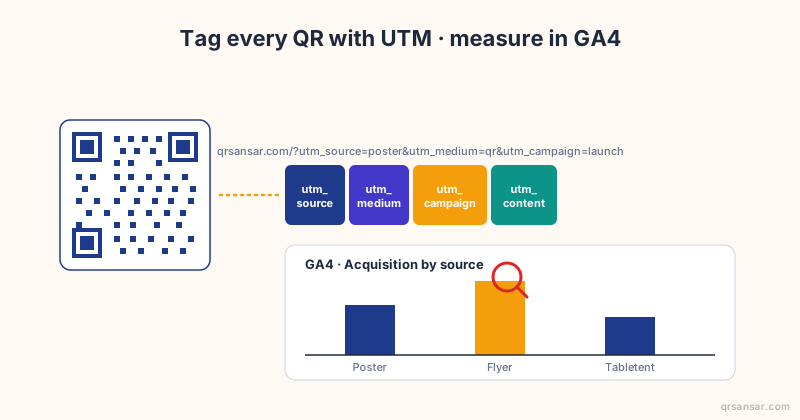
UTM parameters are query-string pairs that Google Analytics and most other analytics platforms read to attribute a session. Five have been standard since the Urchin days, and GA4 added three more.
| Parameter | What it represents | Offline example |
|---|---|---|
utm_source |
The specific origin of the traffic | poster, flyer, menu, tabletent, receipt, banner |
utm_medium |
The channel category | qr for every QR-driven URL |
utm_campaign |
The campaign name | dashain-2026, grand-opening, loyalty-q2 |
utm_content |
Variant or placement | entrance, table-3, back-cover, version-a |
utm_term |
Paid-search keyword | Skip it offline |
utm_id |
Campaign ID, for joining to a cost or CRM table | pr-4471 |
The anatomy looks like this:
https://yoursite.com/promo?utm_source=poster&utm_medium=qr&utm_campaign=dashain-2026&utm_content=cafe-entrance
GA4 also accepts utm_source_platform, utm_creative_format and utm_marketing_tactic. Leave all three off a printed QR. Only utm_source_platform is reported in the standard interface, and each parameter you add costs characters you will pay for in QR density. Google's own URL builders documentation lists the full set and what each one populates; the Wikipedia entry on UTM parameters covers the history if you want it.
A naming convention that survives contact with a second marketer
The most expensive mistake is inventing values as you go. Six months in you have poster, Poster, posters and print-poster in the same property, all describing the same thing, reported as four sources, and nothing to do about it retroactively. GA4 stores what it receives. It does not normalise case for you.
Decide the vocabulary once:
utm_mediumis alwaysqr. Notprint, notoffline, notqrcode. One value gives you a single filter that isolates every scan-driven session in the property, across every campaign and every year.utm_sourceis the physical artefact:poster,flyer,menu,tabletent,business-card,packaging,receipt,vehicle,billboard,decal.utm_campaignis the business reason, kebab-cased:dashain-2026,loyalty-q2,grand-opening-pokhara.utm_contentis the location or variant:table-3,entrance,kathmandu-thamel,version-a,back-cover.
Lowercase, kebab-case, no spaces, no accents, no capital letters anywhere. Write the full list into a sheet, share it with whoever briefs the designer, and treat it as locked once anything goes to print. You cannot edit a poster.
Committing the UTM values to a spreadsheet before the artwork exists is the cheapest hour in the whole campaign. It also forces stakeholders to agree on the campaign name early, which is usually the real bottleneck.
The Unassigned trap nobody warns you about
Here is the part that makes people think their tagging failed when it worked.
GA4 sorts every session into a default channel group using Google's own rules, and those rules key off utm_medium. The recognised values are the ones Google's ad ecosystem uses: cpc, organic, email, referral, affiliate, social and a handful more. qr matches none of them, so sessions from your beautifully tagged posters land in Unassigned in every report that groups by channel.
Your data is not lost. Source, medium, campaign and content are all recorded and all queryable. It is the channel grouping, and only the channel grouping, that shrugs.
Two ways to respond, and only one of them is right:
- Change the medium to something GA4 recognises. Do not. Tagging a poster as
cpcorreferralto satisfy a bucket pollutes the reports that actually drive paid-media decisions, and you lose the one filter that cleanly separates offline scans from everything else. - Create a custom channel group. In GA4, go to Admin, then Data display, then Channel groups, and add a group with a rule that reads "Session medium exactly matches qr" and names the channel something like QR / Offline. Custom channel groups apply to historical data in most reports, so you can do this after the campaign has started, though the default group keeps showing Unassigned alongside.
Option 2 takes about four minutes and turns your offline print into a named line in the same report as email and organic search. That is the view an executive actually reads.
Where the numbers show up in GA4
Three places, in order of how often you will use them:
- Reports, Acquisition, Traffic acquisition. Switch the primary dimension from Session default channel group to Session source / medium, and
poster / qr,flyer / qrandtabletent / qrappear as their own rows. This is the two-click answer to "did the posters work". - Explore, free-form. Dimensions: Session campaign, Session source, Session manual ad content. Metrics: Sessions, Engaged sessions, Key events. This is where you answer which placement converted, not just which one got scanned.
- Realtime, for the sixty seconds after you test-scan the printed proof. More on that below.
One terminology note that trips up anyone returning to GA4 after a break: what used to be called conversions are now key events. Google renamed them in March 2024, and "conversion" now refers specifically to what Google Ads optimises toward. Same measurement, different label in every report.
One paragraph on attribution, because the defaults rarely suit print. GA4's default model is data-driven, spreading credit across touchpoints. For a QR campaign where the scan is effectively the whole journey, last-click reads cleaner, and the model is set per property under Admin, Attribution settings. Lookback windows default to 30 days for acquisition key events (first_open and first_visit) and 90 days for every other key event, with 30 and 60 available; a Google update in August 2026 also allows any whole number of days inside that range. If your offline campaign feeds a long B2B consideration cycle, widen the window before the campaign starts. Changes apply to future data only, and nothing reprocesses retroactively. Google documents this under attribution settings and the key event lookback window.
The URL length trap
A QR code's density scales with the length of the string it encodes. This is the practical problem that no analytics guide mentions, because analytics people do not print things.
Your tagged URL is encoded in byte mode. QR's denser alphanumeric mode only covers digits, uppercase letters and nine symbols, and ?, =, & and lowercase letters are not among them, so a UTM-tagged URL never qualifies. Byte mode capacities at error correction level M, with the resulting symbol size:
| Version | Byte capacity (level M) | Modules per side |
|---|---|---|
| 3 | 42 | 29 |
| 5 | 84 | 37 |
| 7 | 122 | 45 |
| 10 | 213 | 57 |
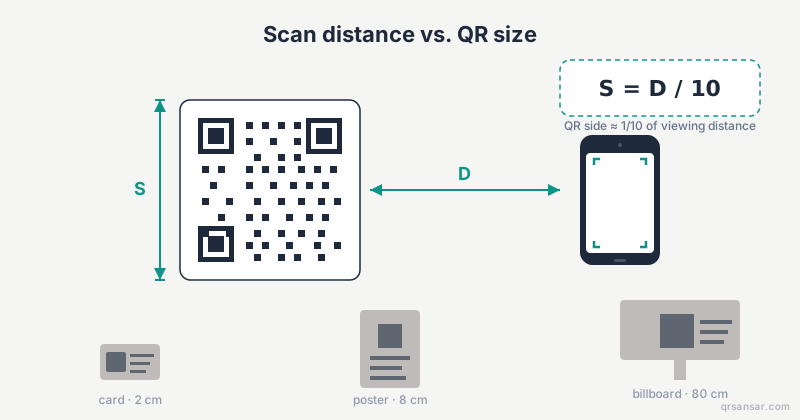
A 30-character landing page URL fits in version 3. Add a full four-parameter UTM set, around 80 characters, and you are at 110 characters, which needs version 7. At the same printed size, each module is now 36 percent smaller than it was. That is the difference between a poster that scans from two metres and one that needs someone to walk up to it.
Three ways out.
Option 1: carry fewer parameters
Keep utm_source and utm_campaign, drop utm_content, and hard-code the medium at the landing page instead. You lose per-placement granularity and keep the symbol small. Reasonable for a single-placement campaign, painful the moment you want to compare two posters.
Option 2: redirect on your own domain
Encode something like https://yoursite.com/p1 and have your own server append the UTM parameters before redirecting to the canonical landing page. The QR stays at version 3, the analytics stay complete, and nobody else sits in the path. This is the best option if you have an engineer and the campaign is worth an hour of their time.
Do not reach for a public link shortener to do this. We wrote a whole post on why third-party shorteners have no place in a static QR code: the printed code outlives the free tier.
Option 3: use a dynamic QR
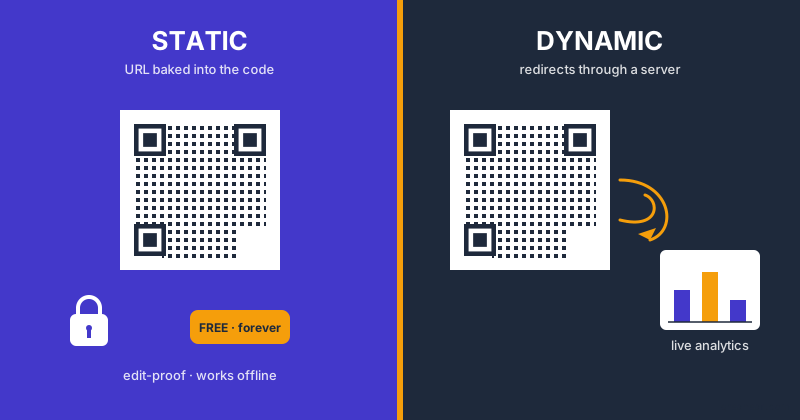
Same redirect trick, hosted. You configure the long UTM-laden destination once, the QR encodes a short code, and the redirect carries the scanner through. A dynamic QR on QRSansar encodes https://qrsansar.com/r/{code}, which is short enough to stay in version 3 territory no matter how long the destination grows.
Two things we have shipped since this post first went up are worth knowing:
- Custom short codes.
/r/hs59zrcan become/r/bdsapp, and renaming keeps the old code alive permanently as an alias, so anything already printed still resolves. Currently an Enterprise-tier capability. - A branded short domain.
qrsr.cc/{code}instead of the canonical link, granted per customer rather than sold as a tier. Both hosts resolve every code, so switching never breaks a printed QR.
The general static-versus-dynamic tradeoff, including the parts that argue against dynamic, is in our honest 2026 comparison. For how URL length translates into required print size, see the print-size formula.
Build the tagged URL without typing it
Hand-typing UTM parameters is where utm_campain comes from. Use a builder.
Our sister site runs a free Campaign URL Builder that validates the required fields, offers channel presets, cleans up naming, preserves any query parameters already on your destination URL, and does all of it in the browser with nothing uploaded. When the URL is ready, its hand-off button opens qrsansar.com/new with the campaign prefilled, which forwards to our URL generator with the field already filled and the QR rendered. No account needed for a static QR, no retyping, no transcription error between the two tools.
That hand-off carries one genuinely hard case, and it is worth knowing about even if you never use our tools. A Google Play campaign URL carries its tracking inside a referrer= parameter that is itself a percent-encoded query string:
https://play.google.com/store/apps/details?id=com.acme.app&referrer=utm_source%3Dfacebook%26utm_medium%3Dcpc%26utm_campaign%3Dspring-sale-2026
Decode that string one time too many and the referrer's own pairs merge into Play's query string. Play then receives referrer=utm_source and nothing else, install attribution vanishes, and no error appears anywhere. We decode exactly once and hold a test on that exact vector. If you are passing Play or App Store URLs between tools, paste one through and check that %3D and %26 are still escaped at the other end.
On an existing dynamic QR, the per-QR page in the dashboard has an Append UTM tracking checkbox that writes utm_source=qrsansar&utm_medium=qr&utm_campaign={short_code} onto the destination. It is a sensible default for a link you tagged nothing else with. For a campaign you are actually reporting on, set your own values.
One QR per placement, without a QR per hour of work
Per-placement attribution means a different utm_content on every printed code, which means a batch job.
For a list you already have in a spreadsheet, the bulk generator takes a CSV of label, data rows and returns one styled QR per row. For a sequence you can describe with a pattern, the serial QR generator is faster, because the placement label is the only thing changing. Give it a serial pattern and a URL wrapper:
Serial pattern:  table-{n}          (start 1, count 4)
URL wrapper:     https://nepalcoffee.example/order?utm_source=tabletent&utm_medium=qr&utm_campaign=tabletent-2026&utm_content={serial}
The wrapper substitutes {serial} on every row, so you get four QRs carrying utm_content=table-1 through table-4, named by serial, styled with your logo and colours, downloaded as a ZIP. Everything runs in the browser, up to 500 codes per batch. The same pattern covers 60 numbered posters (poster-{n:3}) or 200 shelf labels without touching a spreadsheet.
Worked example: the four-table coffee shop
A specialty coffee shop in Pokhara has four indoor tables. Each gets a table tent whose QR lets a customer tip the barista or order a second round without flagging down staff. The owner wants to know which table earns the most orders, partly to decide placement and partly to decide whether the whole experiment is worth keeping.
The setup:
- One landing page:
https://nepalcoffee.example/order - Campaign
tabletent-2026, mediumqr, sourcetabletent - Four
utm_contentvalues:table-1throughtable-4
Each URL runs about 130 characters, which is version 8 territory at level M. On a 4 cm table tent that is legible at arm's length and nothing more, which is fine for a table tent and would be a poor choice for a window poster. If the owner wants headroom, the alternative is encoding https://nepalcoffee.example/t/1 through /t/4 and appending the UTMs server-side, which drops the symbol back to version 3.
Generate all four from the serial generator (pattern table-{n}, wrapper ending in utm_content={serial}), print, and wait two weeks. Then open Explore, dimension by Session manual ad content, and read the four rows.
The table furthest from the counter usually wins. Customers there wait longest and have the most reason to self-serve. That is the kind of finding that pays for the analytics setup in one quarter, and you cannot get it from a single untagged QR on all four tents.
Two sets of numbers, and the gap between them
If your QR is dynamic, you now have scan counts on our side and session counts in GA4. They will not match, and the gap is the most useful diagnostic in this whole setup.
The dashboard logs a scan when the redirect fires, broken out by day, device and country. GA4 logs a session when the landing page loads and the tag runs. Every scan that never becomes a session is a person who pointed their camera and then did not arrive: a slow page, a broken page, a redirect the browser blocked, a preview pane that fetched the link without a human behind it, or someone who lost patience during the interstitial.
- Scans roughly equal sessions. Healthy. Read GA4 and stop worrying.
- Scans far exceed sessions. Look at the landing page, not at the tagging. Page weight on a 3G connection in a café is the usual culprit.
- Sessions exceed scans. Your tagged URL is circulating somewhere other than the print you counted, which is worth knowing before you attribute it to the poster.
You only get that comparison when one party owns the redirect and the other owns the page. It is the strongest practical argument for a dynamic QR on a campaign you intend to report on.
Validate before the print run
Four checks, in this order, every time:
- Open the tagged URL in a private window. A typo in a UTM value will not break the page, but a typo in the path will.
- Check GA4 Realtime, switching the "Users by" card to Session source, then Session campaign, and confirm your test visit carries the values you expect. This is the step people skip, and skipping it is how a campaign runs for three weeks tagged
utm_campainbefore anyone notices the campaign name never arrived. - Scan the printed proof with two different phones, at the real print size and the real viewing distance. Not the PDF on your monitor. The paper.
- Confirm the channel group. If you created the custom QR / Offline group, check that the test session landed in it rather than Unassigned.
Closing the loop to revenue
UTMs tell you who scanned. Revenue attribution needs key events (purchase, signup, booking) firing in GA4 with the session's campaign data attached. Shopify, WooCommerce and Magento propagate it. Typeform and HubSpot propagate it. Custom-built sites usually need a small piece of glue: read the UTM values from the landing URL, store them in a cookie or localStorage for the session, and attach them to the key event when it fires.
That glue is the difference between reporting "150 scans last month" and reporting "150 scans, 23 orders, NPR 47,000 attributed, 4.7x on print spend". Only one of those sentences gets next quarter's budget approved.
FAQ
Why is my QR traffic showing as Unassigned in GA4 when the UTMs are correct?
Because utm_medium=qr is not one of the media GA4's default channel grouping recognises. The data is recorded correctly and shows up fine under Session source / medium. Build a custom channel group (Admin, Data display, Channel groups) with a rule matching medium qr and give it a name.
Should I use a different utm_medium to avoid Unassigned?
No. Changing the medium to cpc or referral contaminates reports your paid-media decisions depend on, and you lose the single filter that isolates offline scans. Fix the grouping, not the tagging.
Do UTM parameters make a QR code harder to scan? They make the symbol denser, which is the same thing at a fixed print size. Roughly every 20 extra characters pushes the code one version larger. A four-parameter UTM set on a short URL typically moves version 3 to version 7, shrinking each module by about a third. Either print it bigger or move the parameters behind a redirect.
Can I add UTM parameters after the QR is printed? Only if it is dynamic. A static QR encodes the final URL and is fixed the moment it hits paper. With a dynamic QR you edit the destination, UTMs included, and every printed code picks up the change on the next scan.
Key takeaways
utm_medium=qron every QR-driven URL, always lowercase, always kebab-case, decided in a spreadsheet before the artwork exists.- GA4 files
qrtraffic as Unassigned by default. A custom channel group fixes the report in about four minutes and keeps the tagging honest. - A UTM-tagged URL encodes in byte mode: roughly 20 characters per QR version, and a full tag set typically costs you a 36 percent reduction in module size.
- Put the parameters behind a redirect (your own server, or a dynamic QR) when the print is small or the viewing distance is long.
- Scan counts and GA4 sessions should roughly agree. When they do not, the landing page is the suspect, not the tagging.
- Test in Realtime before the print run. After the print run there is nothing to fix.
Build the URL in the Campaign URL Builder, hand it to the QR generator in one click, and generate per-placement codes in the serial generator. Then the next time someone asks whether the posters worked, you answer with a number instead of a shrug.
The share card on this article carries a QR tagged the same way we are telling you to tag yours: source og-card, medium qr, campaign blog-share, content the article slug. We would rather eat our own cooking in public than recommend a convention we do not run ourselves.