QR Error Correction Levels: When to Use L, M, Q, or H

A One-Paragraph Primer on Reed-Solomon
Every QR code carries redundant data — extra bytes that let the scanner reconstruct the payload even when part of the image is dirty, scratched, faded, or obscured. The redundancy uses Reed-Solomon coding, the same family of error-correcting codes that protect data on CDs, DVDs, deep-space probes, and DSL lines. The intuition without the algebra: the encoder treats your message as the coefficients of a polynomial, evaluates that polynomial at extra points to produce check symbols, and the decoder can recover the original message even when several of those points are wrong, as long as fewer than half the redundant points are corrupted. Wikipedia's Reed-Solomon article is the canonical reference if you want the mathematics; for QR specifically, the spec is ISO/IEC 18004 and the original inventor Denso Wave maintains a clear page on the four error correction levels.
That is the entire mechanism. The only knob you turn as a designer is how much redundancy to spend.
The Four Levels at a Glance
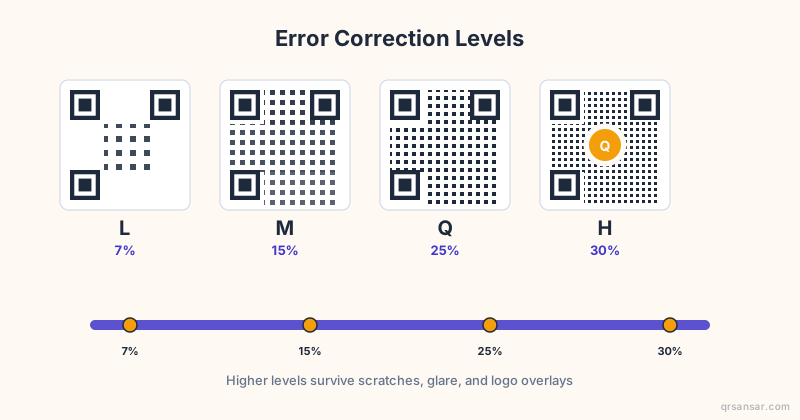
QR defines exactly four error-correction levels, named by single letters. The percentages refer to the proportion of codewords (not bits) that can be recovered if damaged.
| Level | Recoverable Codewords | Typical Use | Visual Density |
|---|---|---|---|
| L (Low) | ~7% | Clean screens, controlled environments | Lowest |
| M (Medium) | ~15% | Print marketing, general default | Low-medium |
| Q (Quartile) | ~25% | Industrial labels, outdoor signage | Medium-high |
| H (High) | ~30% | Logo-embedded codes, harsh environments | Highest |
A few facts worth internalizing before we get to recommendations:
- Higher ECC does not change the information you can encode. A 50-character URL at level L holds the same 50 characters at level H. What changes is the number of modules (the little squares) needed to fit both the data and the redundancy.
- For a given payload, jumping from L to H typically pushes the code into the next QR version — a denser grid. A short URL at L might be version 3; the same URL at H might be version 5.
- Higher ECC means smaller individual modules at the same printed size, which means a higher minimum scan resolution. There is a real trade-off, not a free lunch.
- The decoder does not care which level you chose at encoding time — that metadata is embedded in the format-information ring around the finder patterns. Any compliant scanner reads any level.
Why the Trade-Off Matters
The naive instinct is to always pick H. More resilience is better, right? Not in practice.
Imagine a 30-character URL printed at 2 cm square on a business card.
- At level L, the code might be QR version 2 (25 by 25 modules). Each module prints at 0.8 mm. Even a budget phone camera resolves this comfortably.
- At level H, the same URL might require QR version 4 (33 by 33 modules). Each module now prints at 0.6 mm. Some older phones, glossy laminations, or low-angle scans start failing.
You traded scan reliability for damage resilience — and on a clean printed business card that is never going to get scratched, you spent the resilience on a threat that does not exist. Meanwhile you lost some of your scan-from-across-the-table convenience.
The right level is the lowest level that survives your worst realistic damage scenario. Anything higher is a tax.
"Pick the error correction level for the environment your QR will live in, not for the environment you wish it lived in. A code on a server-rack label needs Q. A code in a PowerPoint slide needs L."
Real Recommendations by Use Case
Screens, slide decks, video calls — use L
If your QR will be displayed on an OLED panel, a Zoom screenshare, a TV in a lobby, or a presentation slide, use level L. There is no smudge, no fade, no UV, no thumbprint. The display is the cleanest scan environment that exists. The 7% redundancy is more than enough to absorb compression artifacts and moiré from a phone camera scanning the screen. Choose L and let your modules stay large.
A common mistake here is to pick H "to be safe" for an on-screen webinar QR. The QR ends up so dense that attendees on the back row of a 200-seat venue cannot scan it from their phones. Density is the enemy on screens.
Print marketing, magazine ads, postcards — use M
This is the default the QRSansar URL generator ships with for a reason. Level M handles typical print abrasion, the occasional smudge from a reader's coffee, light bending of a postcard in a mail tray, and standard CMYK ink dot-gain — all without inflating module count enough to hurt close-range scans. For general-purpose printed marketing where the code will be touched by hands but not weather, M is correct.
Industrial labels, warehouse, outdoor signage — use Q
If the code lives on a shipping label, a piece of equipment, a warehouse bin, a meter cabinet, or a road sign, it will encounter UV bleaching, condensation, scuffing from forklift straps, partial occlusion by dirt, and reading angles that are nowhere near orthogonal. Level Q gives you 25% damage tolerance which, in practice, means a scanner can still recover the payload even when a quarter of the code is unreadable. For logistics tracking QR codes and similar industrial applications, Q is the right floor.
Q is also what we recommend for bulk-generated staff ID cards where the cards will be worn on lanyards, run through laundry pockets, and dropped on parking-lot asphalt over a multi-year lifetime.
Logo embedding or harsh environments — use H
There is exactly one design pattern that requires H: putting a logo, icon, or photograph in the center of a QR code. The logo physically destroys the modules it covers. To survive that intentional destruction, you need the maximum redundancy. As a rough rule, a logo covering up to about 20% of the code's area is safely recoverable at level H, with a small safety margin.
H is also appropriate for codes that will be tattooed onto skin, etched onto metal that will rust, embroidered into fabric, or applied to tombstones — applications where the medium itself will alter the code over time and a print refresh is not an option.
How Error Correction Interacts With Other Design Choices
Three other variables move in the same direction as ECC and compound it. Knowing this prevents nasty surprises.
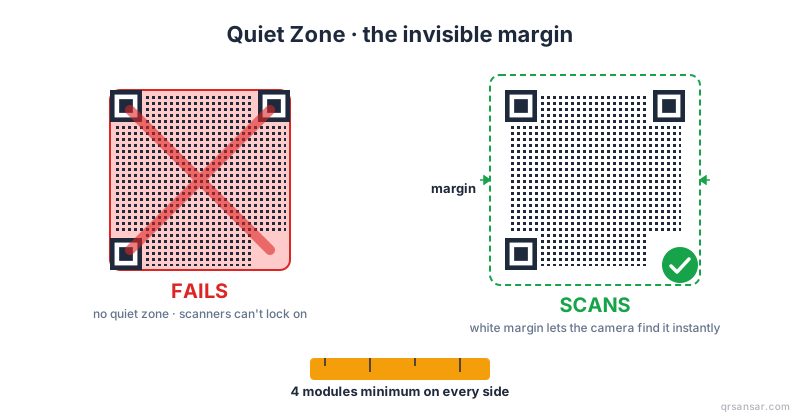
Quiet zone (the white padding around the code). The QR spec requires at least four modules of clear margin on all sides. Squeezing the quiet zone is the most common cause of scan failures, and it gets worse at higher ECC because the format-information ring is the first thing decoders look for. Our post on quiet-zone QR code padding covers this in depth.
Color and contrast. Pure black on pure white is the easy mode. Pastels, gradients, and brand-color codes reduce the effective contrast the scanner sees, and at high ECC the smaller modules amplify the problem. We dig into safe color ratios in our piece on QR code color contrast and accessibility.
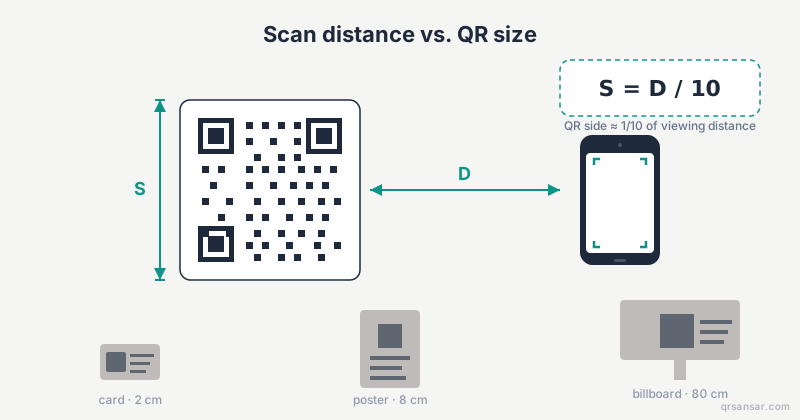
Module size at print. A useful rule of thumb: the smallest module must be at least 0.4 mm to scan reliably with a modern phone camera from a phone-in-hand distance. At 10x distance, multiply accordingly. Pushing ECC up while keeping the printed code small can put you below this threshold without realizing it.
A Practical Checklist Before You Hit Generate
Run through these questions before locking in a level:
- Where will this code live? Screen, paper, plastic, metal, outdoors, in a pocket?
- How long will it live? A one-week campaign and a five-year asset label are different problems.
- What is the worst plausible insult? Coffee stain? UV bleaching? A logo overlay? A laundry cycle?
- What is the printed module size? If you can measure it in millimeters, you can predict success.
- Is a logo or brand mark going in the center? If yes, H is non-negotiable.
- Will the scan angle ever be off-axis? Codes on curved or angled surfaces benefit from one level higher than the flat-paper equivalent.
If you answer those honestly, the level chooses itself.
Common Mistakes We See
- H by default on a clean digital screen. Inflates density, hurts scan range, fixes no real problem.
- L on a parking-lot sticker. Six months of sun and the code stops scanning. Should have been Q.
- M with a giant logo overlay. The logo destroys more than 15% of the modules and the code becomes unreadable. Should have been H.
- Cropping the quiet zone to "make the design tighter." No level of ECC compensates for a missing quiet zone.
- Choosing ECC without choosing a print size. The level and the printed module size must be designed together, not in sequence.
Bottom Line
For most QRSansar users generating one or two codes for a campaign, level M is correct and we set it as the default. For bulk-generated codes on physical assets, bump to Q. For anything with a logo in the middle, use H. For codes that will only ever appear on a screen, L is faster to scan and equally reliable.
Generate your codes at /url for single URLs or /bulk for batches — both let you pick the error-correction level explicitly before download. Test the result against the worst environment you expect, not the best, and your codes will outlive the campaign that needed them.