This message will be pre-filled in the chat. The user can edit it before sending.
The WiFi name exactly as it appears on devices. Case-sensitive.
Leave empty for open networks.
Choose the encryption your router uses. Most home networks use WPA/WPA2. Newer routers may support WPA3.
Create a digital business card. Scanning adds the contact directly to the phone. Only name is required — everything else is optional.
Create a calendar event. Scanning adds the event to the phone's calendar app.
End time must be after the start time.
🍎 App Store QR — links directly to your iOS or macOS app listing. Scanning on iPhone opens the App Store. On Android it opens in the browser. Need one QR for both platforms? Try Smart Link.
📲 Google Play QR — links directly to your Android app listing. Scanning on Android opens the Play Store. On iPhone it opens in the browser. Want iOS support too? Try Smart Link.
Paste the full link to your app listing.
🔀 Smart Link — iOS users go to the App Store, Android users go to Google Play, and desktop visitors see a download page with both badges. Must be saved as a Dynamic QR.
Smart Link must be saved as a Dynamic QR — log in to continue.
Shape of the data pixels.
Shape of the 3 finder patterns.
Inner dots inside corners.
Overall shape of the QR code.
Pre-styled designs for specific use cases. Applies colors, shapes, frame & CTA in one click.
One-click color themes. You can further customise after picking a preset.
Keep strong contrast between foreground and background for reliable scanning.
#000000
100%
#000000
100%
#000000
100%
#ffffff
100%
Place a logo at the center of the QR code. Error correction is automatically set to High when a logo is added.
From a feedback button next to the soap dispenser in a Bangkok airport, to a QR-tagged rhino passport in Kruger, to a Mendoza vineyard scanned at a London restaurant: a growing library of real-world places where QR is doing the quiet work.
✨Story of the day
🇦🇺
Australia · Patrolled beaches & surf clubs
Rip warnings on the phone before the boogie board hits the sand
Surf Life Saving signs on Australian beaches carry QR codes that load today's rip current map, jellyfish sightings, water temperature, and CPR instructions onto your phone in seconds. Kids scan in the carpark before unbuckling the board. The patrol's morning briefing reaches swimmers who would never hear a tannoy.
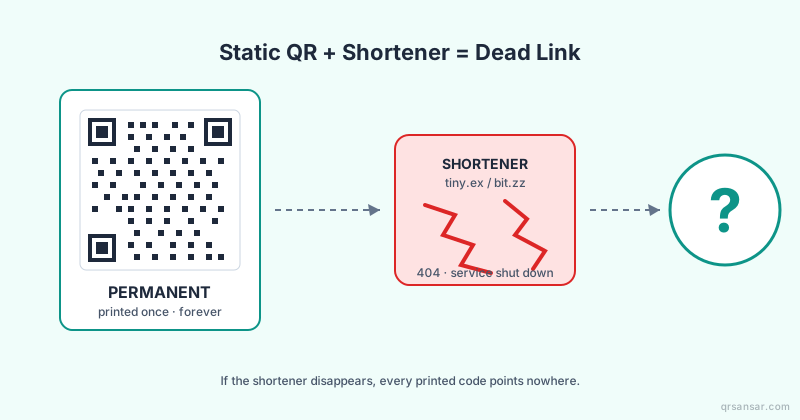
No. Static QR codes are generated in your browser and never expire; they keep working forever. Dynamic QR codes linked to uploaded documents stay active as long as your account is active.
Is QRSansar free to use?
Yes. All QR code types and customization options are 100% free. Download as PNG, JPG, or SVG with no sign-up. A free account (no credit card) unlocks PDF and WEBP downloads, logo uploads, dynamic QR codes, and up to 10 document uploads. Premium adds bulk generation and analytics.
Can I add my logo to a QR code?
Yes. Upload any PNG or SVG logo in the Customize panel. QRSansar automatically adjusts error correction so the code stays scannable.
What image formats can I download?
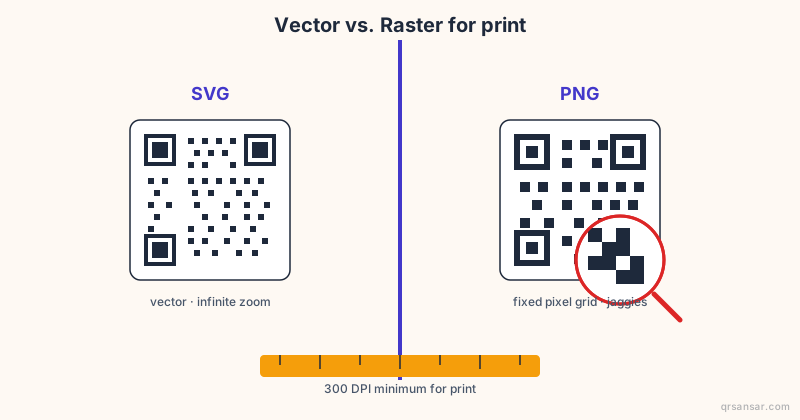
PNG, SVG, PDF, and WEBP. SVG is ideal for print because it scales to any size without pixelation.
Can I update a QR code after printing it?
With Document QR, you can replace the file anytime while the printed link stays the same. Static QR codes encode data directly and cannot be changed after creation.
Are QRSansar QR codes safe for commercial use?
Absolutely. No watermarks, restrictions, or fees. QR codes you generate are yours to use freely for any purpose.
We use cookies for analytics and to improve your experience. Learn more
Stay updated!
Get notified about new features and updates from QRSansar.