Color Contrast for QR Codes: The 4:1 Rule and the Logo-Embedding 30% Rule

The brand-palette trap
A marketing designer gets a brief: produce QR codes for the campaign in the brand's signature pastel pink and sage green. The QRs look stunning in the mockup. The CMO approves. 50,000 flyers ship. Conversion is a quarter of what the previous black-on-white campaign achieved.
The problem is not the campaign. It is the contrast.
QR scanners care about exactly one optical property: the luminance difference between the dark modules and the light modules. They do not care about hue. They do not care about brand palette. They certainly do not care that the design system specifies #F4B6C2 for primary accents. If the dark modules and light modules sit too close on the luminance scale, the scanner cannot tell them apart, and the code fails.
Hue is a designer concept. Luminance is a scanner concept. The two only overlap when you measure them.
This post lays out the math, the practical thresholds, the logo embedding rule that everyone gets wrong, and a six-row reference table you can copy.
The basic principle: light light, dark dark
The dark modules of a QR code must be darker than the light modules. This sounds tautological until you realise how often designers invert it accidentally.
A common failure: a brand uses cream (#FFF8E7) as its primary "light" colour and a warm brown (#5C3A21) as accent. The designer places the QR with cream as the foreground (dark modules) and brown as the background (light modules), reasoning that the brown background "matches the catalogue cover". The QR is now inverted relative to the spec — dark modules are lighter than light modules. Many scanners refuse to read it. The ones that do read it succeed because of inverted-QR support, which is unreliable across the device fleet.
Rule one. The modules that look dark to your eye must also be the foreground in your generator settings. Light modules are background. Always.
The contrast ratio formula
The W3C WCAG 2.2 contrast minimum guideline defines contrast ratio between two colours as:
where is the relative luminance of the lighter colour and is the relative luminance of the darker colour, both on a 0-to-1 scale.
Relative luminance for an sRGB colour with channels , , (each normalised to 0-1 and then gamma-corrected) is:
The weighting reflects human visual sensitivity — we perceive green as far brighter than blue at equal intensity, hence the 0.7152 weight versus 0.0722.
For QR codes, the practical threshold sits at roughly:
That is, a contrast ratio of 4:1 or higher is the working minimum for QR codes. WCAG 2.2 mandates 4.5:1 for normal-size body text on accessible web pages; the QR threshold is slightly lower because the modules are larger than 12pt text and the scanner can apply image-processing tricks unavailable to human readers. Still, 4.5:1 is a safer target. Anything below 3:1 is essentially unreadable.
Test pairs you suspect using the excellent WebAIM contrast checker — it accepts hex codes and returns the ratio instantly.
Six color pairs and how they perform
Here is a reference table with real hex values, computed contrast ratios, and the verdict for QR scanning.
| Foreground (dark modules) | Background (light modules) | Contrast ratio | Verdict |
|---|---|---|---|
| #000000 (pure black) | #FFFFFF (pure white) | 21.0:1 | Pass — gold standard |
| #1F2937 (slate-800) | #F9FAFB (slate-50) | 16.1:1 | Pass — modern dark UI |
| #003893 (Nepal blue) | #FFFFFF | 13.7:1 | Pass — brand-safe |
| #5C3A21 (warm brown) | #FFF8E7 (cream) | 9.1:1 | Pass — boutique |
| #6B7280 (slate-500) | #FFFFFF | 4.8:1 | Borderline — print risky |
| #9CA3AF (slate-400) | #F3F4F6 (slate-100) | 1.9:1 | Fail — do not use |
The 4.8:1 row is the cliff edge: on a freshly printed flyer under good light it scans; on a worn business card under fluorescent office light it intermittently fails. Stay above 7:1 for production work and you eliminate the entire category of contrast-related support tickets.
For a contact card QR printed on a business card that may live in a wallet for years, push the contrast as high as you can. Black on white scans after a decade of pocket wear; #6B7280 on white does not.
Inverted QR codes: the modern asterisk
In 2017, the iOS QR code scanner gained the ability to read inverted QRs — light modules on dark background. Modern Android camera apps (Google Lens, Samsung's built-in scanner, Xiaomi's MIUI scanner) added similar support over the following years. Today, perhaps 80-90% of scanners in the wild handle inverted codes.
That 10-20% gap is enough to matter if you ship at scale.
The honest test: take your inverted design, pull out five phones spanning current iOS, current Android, three-year-old Android, a budget device under USD 150, and a feature-phone-with-camera if your audience includes them. Scan each, three times each, in normal indoor light. If every phone reads it every time, you can ship. If one phone fails one scan, you have a print-volume-divided-by-five problem on your hands.
For URL QR codes destined for the general public — flyers, posters, packaging — stick to standard (dark-on-light) orientation. Reserve inverted designs for in-app, on-screen, or branded contexts where you control the viewing device.
Logo embedding: the 30% rule
Every modern QR generator lets you drop a logo into the centre of the code. This works because QR codes include Reed-Solomon error correction (read the Wikipedia article on Reed-Solomon error correction for the mathematical background), which lets the scanner reconstruct missing modules from redundant data.
The four error correction levels — L, M, Q, H — each tolerate a different percentage of the code being damaged or covered:
- Level L (Low) — up to 7% recoverable
- Level M (Medium) — up to 15% recoverable
- Level Q (Quartile) — up to 25% recoverable
- Level H (High) — up to 30% recoverable
The temptation: set ECC to H, embed a logo covering 30% of the code, ship.
This is the single most common QR design mistake and it deserves a warning paragraph.
30% is the theoretical limit, not the practical recommendation. At 30% logo coverage you have spent your entire error-budget on the logo, leaving zero margin for print smudges, camera blur, partial reflections, or wear. The QR scans on your design monitor. It fails on a coffee-stained menu six months later.
The safe practical limit is 20-25% logo coverage. This leaves 5-10% of recovery budget for the inevitable real-world damage.
Concretely: if your QR is rendered at 400×400 pixels, the total area is 160,000 square pixels. 20% of that is 32,000 square pixels, which is roughly a 180×180 centred logo. Stay within those bounds and you keep the safety margin.
Read our full breakdown of error correction levels L, M, Q, H for the underlying mechanics and version-by-version tables.
The sacred corners
There are three locations in every QR code that you must never cover with a logo, sticker, or design element: the finder patterns in the top-left, top-right, and bottom-left corners. These are the three large bullseye-shaped squares.
The scanner's first job is to locate these three patterns. They define the code's position, rotation, and perspective transformation. Cover even one of them and the scanner cannot begin to read the code, regardless of how much error correction budget you have.
The bottom-right corner has a smaller alignment pattern (in Version 2 and up); covering it is also risky but slightly more forgiving than the finder patterns.
A centred logo, occupying 20-25% of the area, never touches any of these. That is why the centre is the canonical logo position.
Combining contrast and logo: the cumulative cost
Contrast issues and logo coverage compound. A QR with 4.5:1 contrast and a 25% logo is much riskier than either issue alone, because the scanner now has to extract data from low-contrast modules and reconstruct a large covered region simultaneously.
If you must use brand colours that bring contrast down to 5:1 or 6:1, keep the logo small (10-15%). If you must use a big logo (25%), keep contrast high (10:1 or above) and use error correction level H. Treat contrast and logo as a shared error budget.
Practical decision flow
For any custom-coloured QR design, walk this checklist:
- Compute the contrast ratio. Hex codes in, ratio out. If under 4:1, change the colours.
- Verify dark-on-light orientation. Foreground colour must be darker than background. If inverted, either flip it or accept the device-compatibility cost and test on five+ phones.
- Set error correction to Q or H if you plan to embed a logo at all. M is acceptable for logo-free designs in clean conditions.
- Size the logo at 20-25% of area maximum. Measure: a 180×180 logo centred on a 400×400 QR is right at the edge of safe.
- Do not cover the three corner finder patterns under any circumstance.
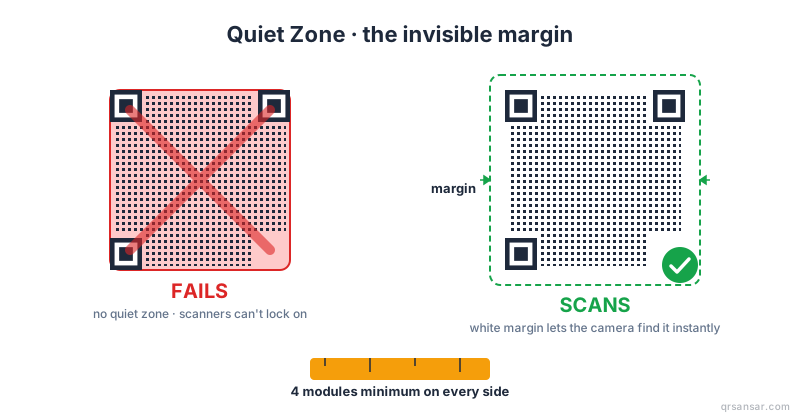
- Maintain the quiet zone — 4 modules of light space around the code, regardless of background colour elsewhere on the design.
- Test scan on a real phone, not just the design preview, on the actual printed medium where possible.
A worked example
A Kathmandu coffee shop wants a QR menu in their brand colours: foreground deep teal (#0F766E), background cream (#FFFDF7).
Step 1: Compute the contrast ratio. Relative luminance of deep teal is approximately 0.143; relative luminance of cream is approximately 0.987. Contrast ratio:
This is 5.37:1, comfortably above the 4:1 minimum, slightly above the WCAG 4.5:1 line. Good.
Step 2: Verify orientation. Teal is darker than cream — correct.
Step 3: They want their logo (a coffee cup silhouette) in the centre at roughly 20% area. Set ECC to H to give 30% budget, use 20% logo, retain 10% margin for real-world wear. Good.
Step 4: Print a single test menu, scan on three staff phones (one iPhone, two Androids), confirm it works at table reading distance under the shop's actual lighting. Approve the print run.
This is the workflow that ships reliably-scanning branded QRs.
What the WCAG numbers really mean for QR
WCAG was written for human readers of web content. QR scanners are not humans, but the underlying physics — light, luminance, the eye's gamma response — is the same. WCAG's 4.5:1 number is a useful proxy for "this will scan reliably". 7:1 (WCAG AAA) is what you should aim for in any production print job. 3:1 (WCAG large-text minimum) is the floor below which you should not go for any QR ever, regardless of how clever your error correction settings are.
If you only remember one number from this post: keep your contrast ratio at 7:1 or higher. Most scanning problems disappear at that threshold.
Closing thought
A QR code is a piece of optical information. The scanner needs the dark modules dark, the light modules light, the corners clean, the margin clear, and the logo modest. Everything else — colour palette, frame design, surrounding artwork — is yours to play with freely, provided you respect those five constraints.
Brand identity and scan reliability are not opposed. Designers who measure contrast ratios before approving palettes ship campaigns that work; designers who pick colours on vibes ship campaigns that don't.
Generate a contrast-safe, logo-ready QR free at QRSansar — built in Kathmandu, no signup, all 31 generators in the browser.