Why You Should Never Put bit.ly Inside a Static QR Code

The Mistake in One Sentence
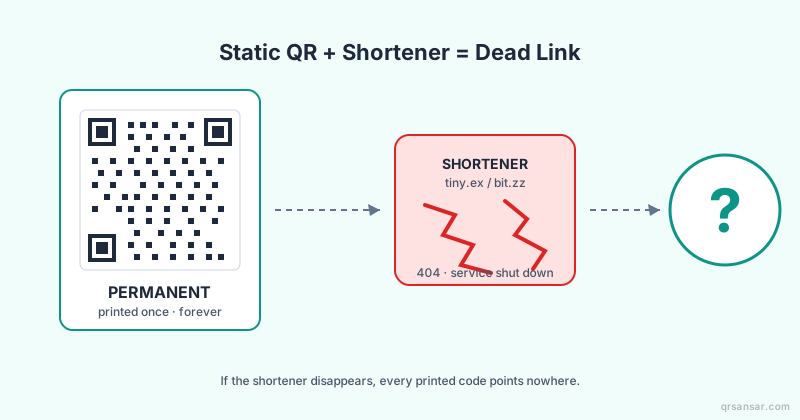
A static QR code's destination is etched into the pattern forever, but a third-party shortener's redirect can be deleted, sold, hijacked, or sunset at any time — which means the moment you print a QR code containing bit.ly/yourcampaign, you have outsourced the survival of every printed copy to a company you do not control.
This is the single most common, most expensive, and most preventable mistake on physical QR codes. It is also the easiest to explain to a non-technical stakeholder once you see the failure mode play out.
What "Static" Actually Means
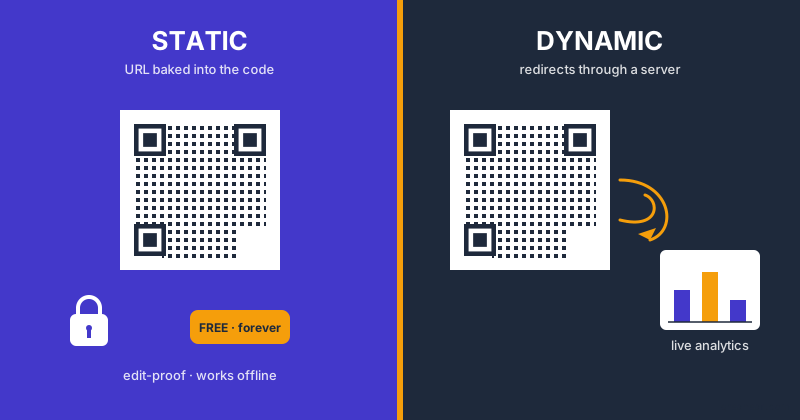
A QR code is not a hyperlink. It is a printed pattern that encodes a string of characters directly. When you scan a static QR for https://example.com/menu, the scanner reads that literal URL from the modules. There is no server in the middle for the encoding side — the printed image is the address.
That immutability is the property that makes static codes attractive. No platform dependency. No subscription. No analytics tradeoff. Generate once at /url, download the PNG or SVG, send to print, done.
The catch: whatever URL you encoded is the URL that will resolve, character-for-character, for as long as the physical code exists. If that URL stops resolving, you have to reprint every copy. Every menu, every poster, every label, every business card.
What a Shortener Adds to the Chain
A shortener like bit.ly works by registering a short slug — say bit.ly/spring-sale — that, on the shortener's server, redirects to a long destination URL you configured. From the scanner's point of view, scanning a QR that encodes bit.ly/spring-sale performs two network requests:
- Resolve
bit.ly/spring-sale. The server returns an HTTP 301 or 302 with aLocation:header. - Follow the redirect to your real destination.
Step one is the failure surface. Anything that breaks the shortener's resolution — corporate decision, security breach, account suspension, DNS hijack, simple bankruptcy — breaks every QR code that depends on it. The dependency is invisible in the printed pattern but absolute in operation.
The Google goo.gl Sunset Is the Textbook Cautionary Tale
In July 2024, Google announced the shutdown of goo.gl, its URL shortener that had been around since 2009. As Google announced on their developers blog, all goo.gl links were sunsetted by August 25, 2025. Anyone who had encoded a goo.gl short link into a printed QR code, a textbook, a museum placard, a product label, a billboard, or a tattoo (yes, this happened) found that the underlying redirect simply stopped working on that date.
There was no negligence on the affected users' part. Google is the closest thing to a permanent web institution there is. The lesson is not "do not trust Google" — it is "do not trust anyone but yourself with a redirect you cannot afford to lose."
Bitly, TinyURL, ow.ly, cutt.ly, t.co, t.ly, and the dozens of others operate at far smaller scale than Google. Their probability of surviving a five- or ten-year QR campaign is, on average, lower. Some will be acquired and shut down. Some will pivot to a different business model and turn unauthenticated short links into paywalled links. Some will get acquired by an adversary; this has happened.
Link Rot Is the Underlying Phenomenon
The QR-and-shortener problem is a special case of link rot, the slow decay of URLs over time as servers move, companies fold, and content gets reorganized. Studies of academic citations have measured link rot at roughly 50% over a decade — half of the URLs cited in journal articles from 2010 no longer resolve. Shortened URLs decay faster than direct URLs because they add an extra dependency.
The defining property of a static QR code is that you printed it once and cannot edit it. The defining property of a URL is that the web underneath it is constantly changing. Stapling those two facts together with a third-party shortener as the seam is engineering malpractice for any campaign you expect to survive more than a quarter.
"The shortener is the seam. Static QR is permanent. The destination is editable. The shortener tries to be both, and ends up being neither when you need it."
The Compromise Scenario Is Worse Than the Sunset Scenario
A graceful sunset, like goo.gl, gives you warning. A compromise gives you no warning and active malice.
In 2022 and again in 2024, multiple security firms documented bit.ly account takeovers where attackers gained access to a brand's account and rewrote the destinations of existing short links. A bit.ly/your-brand-app link that for two years had pointed to your real download page now points to a Trojan APK. From the scanner's point of view, the printed QR code is unchanged. The Bitly status page logs nothing unusual. Customers download malware and blame your brand.
You cannot detect this from the printed code. You cannot fix it from the printed code. The only mitigation is to never have given the redirect away in the first place.
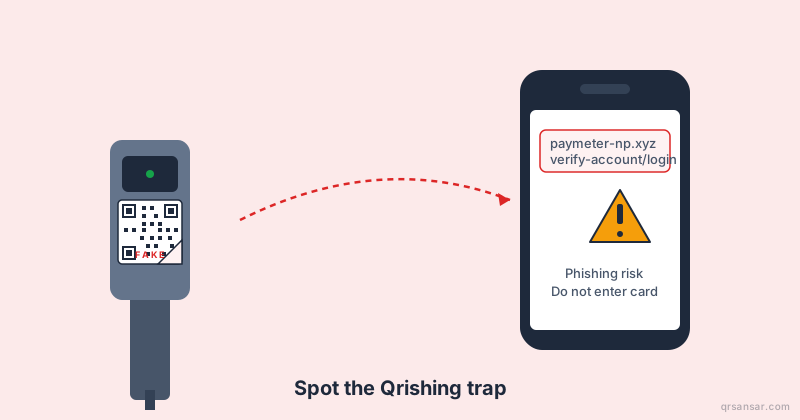
This is the same threat model we cover in our QRishing guide on spotting malicious QR codes, except the attacker did not need to swap a sticker — they took over the redirect remotely.
When Static QR Is Actually Fine
Static is not bad. Static is excellent — when the URL encoded is a URL you control on a domain you own and intend to keep.
Examples of correct static QR usage:
- A QR on a business card that goes to
https://yourname.com/contact. You own the domain, you own the page, no third party in the chain. - A WiFi QR generated at /wifi. It encodes the SSID and password directly — there is no URL and no server in the path.
- A vCard QR from /vcard encoding contact details directly into the pattern. No network round-trip.
- A SEPA payment QR at /epc or a PIX QR — the payment instructions are encoded directly per the EMVCo or local standard.
- A staff ID QR from /bulk/staff-qr pointing to an internal HR endpoint on your corporate domain.
The pattern is consistent: if the destination is data, or a URL on infrastructure you own and operate, static is the right answer. The mistake is specifically using a third-party redirect you do not control as the destination.
The Comparison That Matters
| Property | Static QR direct to your domain | Static QR through bit.ly |
Dynamic QR through your dashboard |
|---|---|---|---|
| Destination editable after print | No | Yes, but by Bitly | Yes, by you |
| Survives shortener shutdown | N/A | No | N/A |
| Survives shortener account takeover | N/A | No | N/A |
| Scan analytics | None | Bitly's, depending on plan | Yours |
| Ongoing cost | None | Bitly plan | QRSansar plan |
| Failure mode if vendor disappears | None | Every code breaks | Migrate redirects to a new host |
The middle column has every failure mode of the right column plus more, and gets you fewer features in return. There is no scenario where it is the correct choice for a printed campaign.
A Migration Checklist If You Already Printed bit.ly QR Codes
If you are reading this with a sinking feeling, work through these steps.
- Inventory every printed asset that uses a third-party shortener. Menus, posters, business cards, product labels, vehicle wraps. List the short URL on each.
- Verify each short link still resolves to your intended page. If any have changed, you may already be compromised; act on that immediately.
- Lock down your shortener account. Strong password, hardware key or passkey, and audit log review for the last twelve months. Remove unused team members.
- Stand up redirects on your own domain. A subpath like
yourdomain.com/go/menuis ideal. Configure each shortener URL's destination to point to the same target as your own redirect — they should be identical, so you can swap later without breaking anything. - Plan the reprint. New codes should encode
yourdomain.com/go/menudirectly, or — better — a dynamic QR managed through /dash so you can edit the destination without another reprint. - Once new codes are in the field, point the shortener URLs to a "this code is out of date" page. This way, lingering old scans degrade gracefully instead of leaking customers to a stale or wrong destination.
- Document the rule going forward. No third-party shortener inside any printed QR. The cost of saying no on day one is zero. The cost of saying yes is a reprint of everything.
The Right Default
If the URL is something you expect to need to change — a marketing campaign target, a seasonal menu, an app-store deep link that varies by region, an event microsite — use a dynamic QR. Generate it at /dash, encode a short link on your own subdomain, and edit the destination from the dashboard whenever you need to. The printed code never changes; the redirect target is yours to operate.
If the URL is genuinely stable — your apex domain, your main contact page, a payment-standard data string — use a static QR at /url directly. No shortener. No middleman.
For a fuller treatment of when each option is correct, see our companion post on dynamic vs. static QR codes.
Bottom Line
The shortened static QR is the worst of both worlds: the inflexibility of static plus the fragility of a third-party redirect. Pick one or the other on purpose. If you need editability, use dynamic with redirects on infrastructure you own. If you need permanence, encode the final URL directly. Never, under any circumstance, hand the destination of a printed code to a shortener you do not operate.
Ready to migrate? Start at the QRSansar dashboard to create dynamic QR codes whose redirects you control end-to-end, or generate a clean direct-URL static code at /url if your destination is truly permanent. Either choice is better than bit.ly inside a printed square.