Accepting Fonepay, eSewa, and Khalti QR Payments: A Guide for Small Vendors in Nepal

Walk into any small shop in Kathmandu, Pokhara, or Birgunj in 2026 and you will see at least one laminated QR card by the till. Tea stalls, momo carts, hardware stores, even a few street-side fruit vendors now take digital payments. The shift happened fast, and most of it runs on three names: Fonepay, eSewa, and Khalti, sitting on top of the Nepal Rastra Bank's NepalQR standard.
This guide is for the small vendor who wants to start accepting QR payments without getting lost in jargon. We will cover what NepalQR actually is, the difference between the three networks, what you need to register, how to print and place the code, and what to do when a customer says they paid but the money has not arrived.
What NepalQR actually is
NepalQR is the country's unified QR payment standard, defined by Nepal Rastra Bank (NRB), the central bank. It is based on the same EMVCo specification used by India's UPI, Singapore's SGQR, and Indonesia's QRIS. The official documentation and updates live on the NRB website. The relevant rules sit under the Retail Payment Strategy and Payment Systems Department circulars.
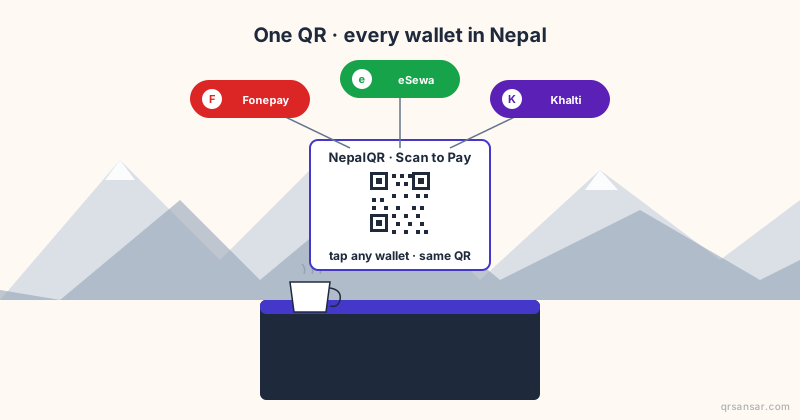
The key design choice: NepalQR is interoperable. One static QR sticker on your counter can be scanned by a customer using any compliant app. The customer does not need to use the same wallet as you. They open eSewa, Khalti, MobileBanking, NIC Asia app, NMB app, Citizens app, or any other certified wallet, and the payment routes through the rails to your registered account.
This is a big deal. Before NepalQR consolidation, a vendor often had to display three or four separate QR codes, one per wallet, and refuse customers whose app did not match. NepalQR ended that fragmentation.
One QR, any compliant app, money in your account. That is the promise of NepalQR. The execution depends on which network and which acquiring bank you sign up with.
The three names you keep hearing
The marketing on storefronts blurs them together, but they are not the same kind of thing.
| Name | What it actually is | Role in QR payments |
|---|---|---|
| Fonepay | Interbank payment switch and network operator | Provides the rails that connect banks and wallets |
| eSewa | Digital wallet (PSP licensed by NRB) | Customer-facing app; also operates merchant accounts |
| Khalti | Digital wallet (PSP licensed by NRB) | Customer-facing app; also operates merchant accounts |
| Banks (Nabil, NIC Asia, etc.) | Acquiring institutions | Issue NepalQR codes tied to bank accounts |
Fonepay is the network beneath much of the interoperability. When a Khalti user scans an eSewa-issued QR, the transaction often touches Fonepay rails on the way through. As a vendor, you do not need to understand the routing; you just need to know that your single QR will accept payments from all three ecosystems once it is properly registered.
For the technical EMVCo and NepalQR generator, /nepalqr builds compliant codes for testing and for vendors whose acquirers issue raw merchant data.
What you need to register as a merchant
Requirements vary slightly by acquirer (bank vs Fonepay direct vs eSewa Merchant vs Khalti Merchant), but the common list is:
- PAN (Permanent Account Number) issued by Inland Revenue Department. For businesses above the VAT threshold, the VAT registration certificate too.
- Citizenship certificate of the proprietor (for sole proprietorships) or the authorised signatories (for partnerships and companies).
- Business registration from the relevant authority: a local municipal ward office for the smallest businesses, the Office of Company Registrar for private/public limited, or the cottage and small industries office where applicable.
- Bank account in the business name (or the proprietor's name for very small operators) at a NepalQR-participating bank.
- Photograph of the shop or business premises, sometimes including the signboard.
- Mobile number registered in the proprietor's name and active on a Nepal Telecom or Ncell SIM for OTP verification.
The first time can take 3-10 working days depending on the route. Once approved, your merchant ID is issued and the acquirer gives you a NepalQR sticker (or you can print your own with the merchant ID baked in).
Four routes to get a merchant QR
You have four practical options. Pick based on what bank you already use and how much volume you expect.
- Through your existing bank. Most commercial banks (Nabil, NIC Asia, NMB, Citizens, Global IME, Kumari, Sanima, etc.) now run a merchant onboarding desk. Walk in with the documents above, sign their merchant agreement, and they issue the QR within a few days. Settlement is into your bank account at the bank.
- eSewa Merchant. Apply through the eSewa app or the esewa.com.np merchant portal. Settlement goes into your eSewa wallet, from where you can withdraw to your bank account. Suits vendors who already use eSewa heavily and want everything in one app.
- Khalti Merchant. Apply through the Khalti app or the khalti.com merchant portal. Similar settlement model to eSewa: into your Khalti wallet, then withdraw.
- Fonepay direct. Some vendors with larger volume go directly to Fonepay, the network operator, via fonepay.com, often through their primary bank.
Across all four, the resulting QR is NepalQR-compliant and accepts scans from any participating app. The differences are in fees (typically zero to 0.5 percent for small merchants, sometimes capped per transaction), settlement timeline (T+0 same-day to T+1 next-day for most networks, T+2 in some cases), and dashboard quality.
Printing the QR: do not get this part wrong
This is where most small vendors lose money to slow scans, faded stickers, and customers who give up and pay cash. The QR you print is the front door of your payments business.
A short checklist:
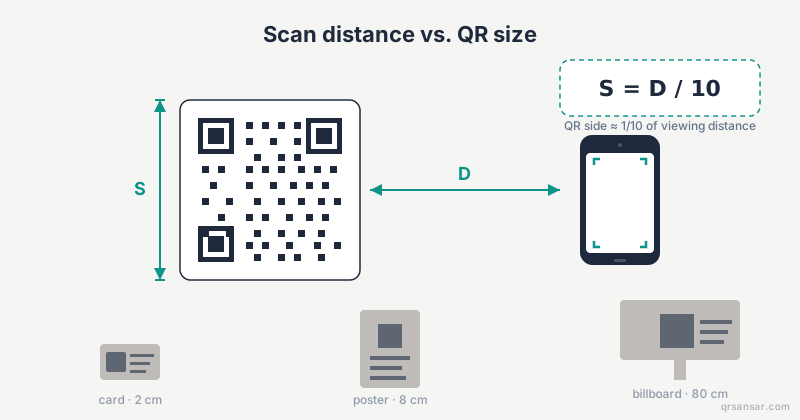
- Size: 10 cm by 10 cm of QR area, minimum, for a counter setup. Add a 2-3 cm white margin all around. The full card ends up around A5 (15x21 cm).
- Material: lamination is non-negotiable. Heat-laminated A5 card or a vinyl sticker on acrylic. Paper warps and yellows within weeks.
- Lighting: place the QR where ambient or overhead light hits it evenly. Strong directional light creates glare on laminate and ruins scans. If your shop is dim, a small clip-on LED costs less than NPR 500 and pays for itself in a month.
- Eye level: the card should sit at the customer's natural eye level when standing at the till. Roughly 130-150 cm off the floor for the average adult. Codes taped flat to the counter top force customers to bend awkwardly and slow the queue.
- One backup: keep a second identical laminated card behind the counter. If the front one gets damaged, spilled on, or peels off, you swap in 10 seconds. Reprinting is a half-day project.
- Signage clarity: above or below the QR, in clear English and Nepali, write something like "Scan with any app to pay" and "कुनै पनि एपबाट स्क्यान गरेर तिर्नुहोस्". Customers should not have to ask.
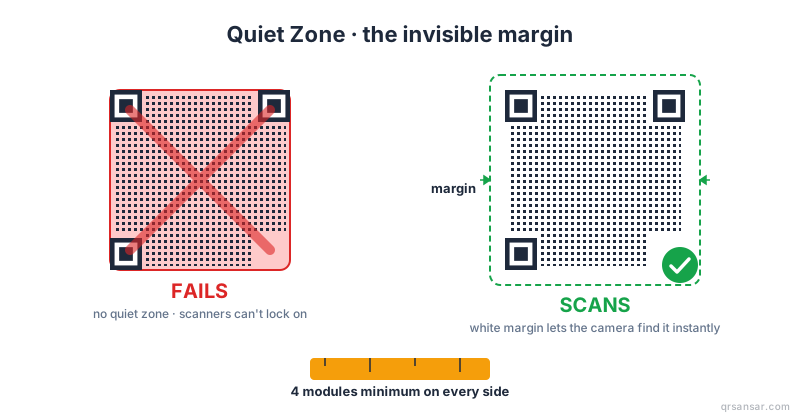
- Quiet zone: maintain the 4-module white padding around the code. See /blog/quiet-zone-qr-code-padding.
- Error-correction level: use M or Q so that minor scuffs and edge wear do not break scans. The /blog/error-correction-levels-l-m-q-h-explained post explains the trade-off.
For restaurants in particular, table-side QR codes need slightly different handling. See /restaurants for table-tent and menu-QR specifics; the same printing principles apply but you also have to think about water rings and grease.
For physical size and scanning distance more generally, the worked formula is in /blog/qr-code-print-size-scanning-distance-formula.
"They scanned but no payment came" - troubleshooting
This is the most common complaint vendors raise to support lines. Nine times out of ten it is one of these.
- Customer's session timed out. Dynamic NepalQR codes (rarely used by small vendors but common in larger retail with a POS) generate a one-time session per amount. If the customer takes too long to confirm, the QR expires. They re-scan and try again.
- Network outage. Either the customer's mobile data dropped or the wallet's backend was momentarily unreachable. Confirm by asking the customer if their app showed "Payment Successful" or "Pending". Pending often resolves within minutes.
- Wrong app version. Outdated wallets (more than a year behind) sometimes fail on newer NepalQR fields. Ask the customer to update.
- Insufficient balance. The customer's wallet had less than the amount due. They will usually realise and admit this.
- Daily limit hit. Each wallet has daily transaction limits (typically NPR 25,000 to NPR 100,000 for tier-1 KYC; higher for fully KYC'd accounts). Customer needs to use a different method or pay in pieces.
- You are looking at the wrong dashboard. If the customer paid via Fonepay rails to a bank-issued QR, the money lands in the bank account, not in your eSewa or Khalti wallet. Log into your bank's merchant dashboard or wait for the bank's daily settlement SMS.
The first thing to do before refusing the goods or rescanning is ask the customer to show you the success screen on their phone. If their app says "Payment Successful" with a transaction reference (टान्सेक्शन रेफरेन्स), the money is on its way. Settlement to your account may be instant or may take until end of day.
Settlement timelines
This is the part most guides skip. Money in the wallet or bank app is not the same as money in your spending account.
| Route | Typical settlement to vendor |
|---|---|
| Bank-issued NepalQR to bank account | Instant or T+0 same day, depending on bank |
| eSewa Merchant | Instant to eSewa wallet; bank withdrawal T+1 |
| Khalti Merchant | Instant to Khalti wallet; bank withdrawal T+1 |
| Fonepay direct | T+0 to T+1 to bank account |
For cash-flow planning, assume T+1 to bank for everything. If you are paying a supplier from your bank account on the same day a customer pays you via wallet QR, you may need to withdraw manually or hold a buffer.
A quick discipline that small vendors find helpful:
- At end of day, open each dashboard (bank merchant app, eSewa, Khalti).
- Note the total received per channel.
- Cross-check against your written or POS sales log.
- Withdraw from wallets to the bank weekly, not daily, to reduce withdrawal-fee impact (most networks cap or zero these, but some still charge for low-amount withdrawals).
Fees, taxes, and what to tell your accountant
Fees on small-vendor QR payments are usually low and sometimes zero. The structures shift, so do not take last year's blog post as gospel. As of writing:
- Most NepalQR transactions for vendors under a turnover threshold attract no merchant discount rate (MDR).
- VAT and income tax obligations on QR receipts are identical to cash. The receipt is taxable revenue at the moment it is received, regardless of channel.
- Keep monthly statements from each acquirer. They become your audit trail.
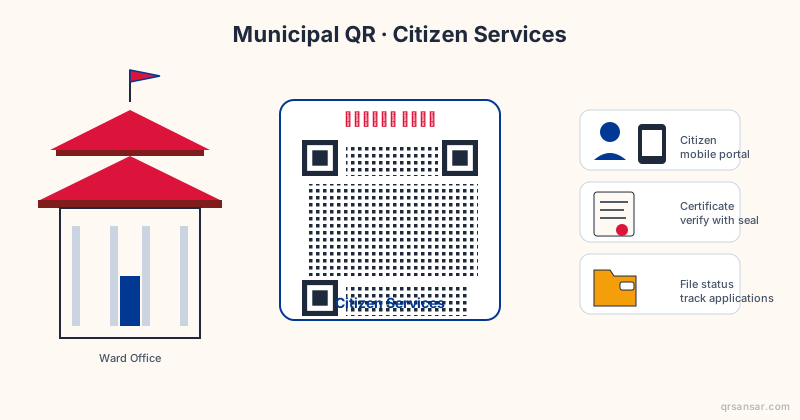
If you are operating in a municipality that is digitising local revenue (parking fees, ward-level service fees, market levies), see /blog/qr-codes-for-nepali-municipalities-e-governance for how NepalQR plays into government collections.
Security and customer trust
QR payments are safer than handing over cash for most small transactions, but vendors should know a few hygiene rules.
- Do not let anyone replace your QR. A known scam in other countries is sticker overlays: a fraudster covers your QR with theirs, intercepting payments. Inspect your card weekly. If your shop is unattended, mount the QR behind glass or in a frame.
- Match the displayed merchant name. When a customer scans, their app shows your registered merchant name. If a customer says "this shows a different name", investigate immediately.
- Do not share OTPs. No legitimate support agent will ever ask for your wallet OTP. This is the most common social-engineering loss in 2026.
- Use a separate phone number for merchant alerts if you can. It keeps your business notifications from being lost in personal noise.
There is a parallel education job for customers, too. Phishing QR codes ("qrishing") on parking meters and posters are increasingly common worldwide. See /blog/qrishing-how-to-spot-malicious-qr-codes and consider sharing it on your shop's social channel.
The short version
- NepalQR is the unified standard. One QR accepts any compliant app.
- Fonepay is the network; eSewa and Khalti are wallets that interoperate over Fonepay rails.
- Register through your bank, or directly with eSewa Merchant / Khalti Merchant.
- Print at 10 cm minimum, laminated, eye level, with a backup.
- Always ask to see the customer's success screen before assuming a failure.
- Plan cash flow on T+1 settlement, not real-time.
- Inspect your QR weekly. Never share OTPs.
A QR sticker is small. The decision to accept digital payments is not. For most small vendors in Nepal in 2026, the gain in queue speed, hygiene, and end-of-day accounting more than pays for the 10 minutes a week of dashboard work.
Generate a NepalQR-compliant code for testing at /nepalqr, or design your full table-side QR setup at /restaurants. All exports are vector SVG, ready for the laminator.