
Dynamic QR Codes.
Edit. Track. Adapt.
Print once, redirect anywhere. From one dashboard you can change where your QR points at any time, see real-time scan analytics, and schedule campaigns. You never reprint a code.
- No app required
- GDPR-friendly analytics
- Cancel anytime
What is a dynamic QR code?
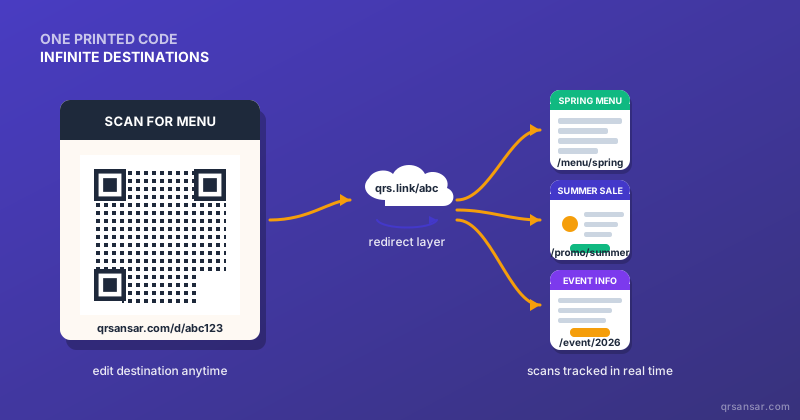
A dynamic QR code is a regular QR symbol whose encoded URL is a short redirect link, not the final destination. When someone scans it, the redirect service (QRSansar in this case) logs the scan and forwards them to whatever URL you currently have configured. The QR symbol on paper never changes; the destination behind it can change as often as you like.
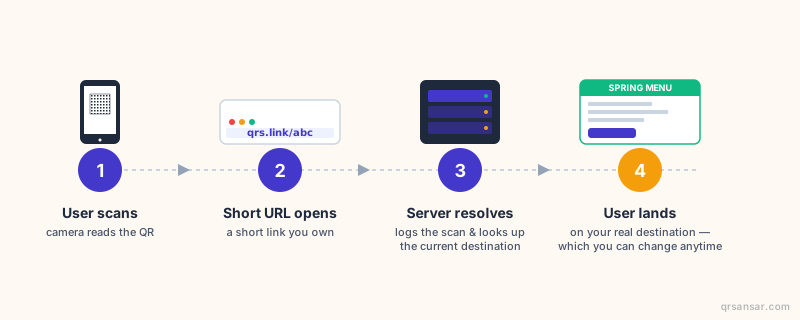
That single architectural difference is what makes editing, analytics, scheduling, A/B testing, and access control possible. The trade-off is that dynamic codes depend on the redirect service staying alive, which is why we wrote an honest 2026 comparison explaining when static is actually the smarter choice.
Try a dynamic QR right here
Type any destination URL below and watch: the QR symbol stays the same while the destination changes. That is the whole point of a dynamic QR, in one widget. (This is a visual demo. No QR is actually saved to our servers.)
Notice the QR pattern never changes when you swap destinations. That's because the QR encodes the short link, not your URL, so once printed it can be pointed anywhere at any time.
Create a real dynamic QR →Same code. Editable destination.
Six things a dynamic QR can do that a static one can't
Edit destination anytime
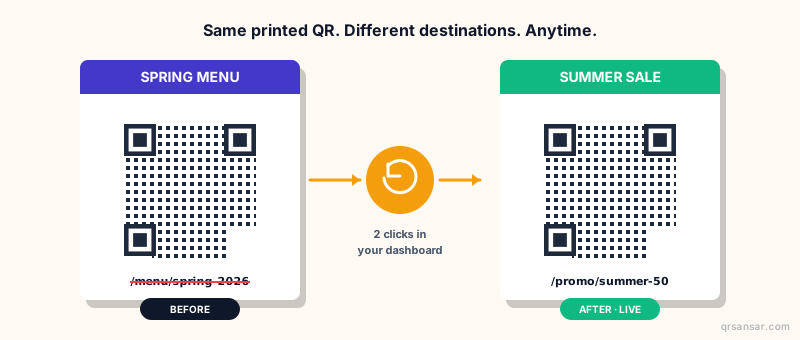
Change where the QR points in two clicks. Posters already out in the wild update instantly, without a reprint or a recall.
Real-time scan analytics
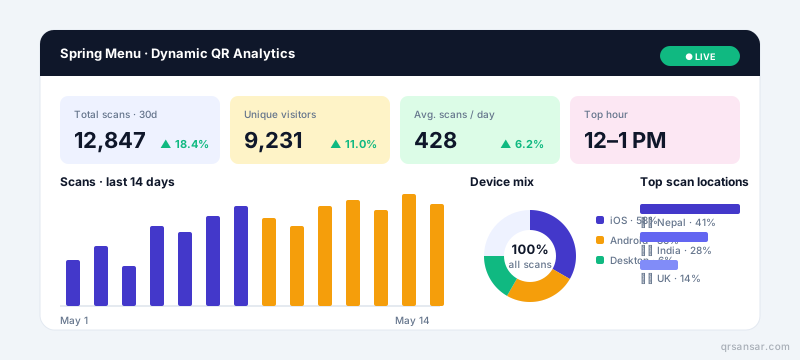
Total scans, uniques, device, browser, country, hour-of-day. Export CSV or pipe into GA4 with built-in UTM tags.
Schedule & expire
Set a go-live date and an expiry date for time-boxed campaigns. Past expiry, scans land on a polite "campaign ended" page.
Password protection
Gate sensitive destinations behind a password. Perfect for B2B sales sheets, internal docs, or VIP-only menus.
Label & organize
Tag every QR with a label, campaign, and team. Filter, search, and compare performance across hundreds of codes.
Bulk creation
Generate hundreds of unique dynamic QRs from a CSV for staff badges, asset tags, table tents, and product packaging.
Static vs Dynamic: pick the right tool
Static codes are free forever and work offline. Dynamic codes cost money but are editable and tracked. Neither is universally better.
| Dimension | Static QR | Dynamic QR |
|---|---|---|
| Cost | Free forever | Subscription |
| Editable after print | ✕ No | ✓ Yes |
| Scan analytics | None | Built-in |
| Works offline | ✓ Yes | ✕ No (needs internet) |
| QR pattern density | Higher (full URL) | Lower (short URL) |
| A/B testing | ✕ No | ✓ Yes |
| Dependency risk | Zero | Service must stay live |
| Best for | WiFi, vCard, payments, permanent assets | Marketing, packaging, signage, anything that may change |
Want the deep dive with real ROI math? Read the honest 2026 comparison →
One QR. Infinite destinations. Edited in seconds.
Where dynamic QR earns its subscription
Six scenarios where the editability and analytics pay for themselves many times over.
Restaurants & cafés
One QR on each table forever. Menus change weekly, but you never reprint table tents. Filter by table to see which spots scan most.
Digital menus →Packaging & products
Printed lot codes that link to current product info, manuals, recall notices, or recipe pages, all updateable for the lifetime of the SKU.
Events & conferences
Lanyard QR for each attendee. Pre-event: agenda. During event: live schedule. After: feedback form. One badge, three lifecycles.
Event marketing →Logistics & tracking
Shipping labels with QRs that always show the latest tracking status. Update the route in your backend and every scan reflects it.
Logistics tracking →Real estate & signage
Yard-sign QRs that redirect to whichever listing is live. Property sold? Point it at the next one. Sign stays up, content rotates.
Real estate →Marketing campaigns
A/B test landing pages on a single printed flyer. See which creative drives more scans by city and by hour, then reroute the loser mid-campaign.
How to create your first dynamic QR
- 1
Create the code
Paste your destination URL in the QRSansar dashboard. We mint a short redirect link and render the QR symbol. Customize colors, dot style, and add a logo.
- 2
Download & print
Export PNG, SVG, PDF, or WEBP. Use it on packaging, posters, business cards, products, signage, or anywhere else a printed QR makes sense.
- 3
Edit & track forever
Open the dashboard anytime. Change the destination, schedule it, password-protect it, or pause it. Watch scans roll in on the live chart.
Authoritative resources on QR codes
We believe in transparent claims. Here are official, neutral sources you can cross-check our information against, including government guidance and the underlying ISO standard.
Dynamic vs. Static QR Codes: The Honest 2026 Comparison
Our long-form breakdown with real ROI math, common mistakes, and when static is actually the smarter call.
Read the article → gov.uk · OfficialUK Government guidance on QR codes
The UK government's formal guidance on QR code usage, written for public-sector deployments. Useful baseline for compliance contexts.
Open on gov.uk ↗ ISO · StandardISO/IEC 18004: QR code symbology spec
The formal international standard that defines QR code structure, versions, error correction, and module encoding. Both static and dynamic QRs comply with this.
View standard ↗ FTC · Consumer alertFTC: Scammers hide harmful links in QR codes
U.S. Federal Trade Commission advice on spotting malicious QRs ("quishing"). Important context for anyone deploying QR campaigns in public spaces.
Read FTC alert ↗ Wikipedia · ReferenceQR code: Wikipedia overview
General-audience reference covering history, versions, error correction levels, and modern applications. A good neutral starting point.
Open on Wikipedia ↗Dynamic QR: frequently asked questions
What is a dynamic QR code?
A dynamic QR code is a regular QR code whose encoded URL points to a short redirect link you control. When someone scans it, the redirect service logs the scan and forwards them to whatever destination URL you currently have set. Because the printed QR encodes the short link rather than the final destination, you can change where it points at any time without reprinting.
How is it different from a static QR code?
Static QR codes encode the final URL directly into the code, so the destination is permanent. Dynamic QR codes encode a short redirect URL, so the destination is editable. Static is free and works offline forever; dynamic costs a subscription but gains analytics, scheduling, and the ability to fix or update what the code points to.
Do I have to reprint my QR if I edit the destination?
No. That is the entire point of a dynamic QR. The printed symbol never changes; only the destination it redirects to does. You can ship 10,000 packages today, update the destination tomorrow, and every scan from now on lands on the new URL.
What analytics do I get with QRSansar dynamic QR codes?
Total scans, unique visitors, scan-over-time charts, device breakdown (iOS / Android / desktop), browser, country, and city when consent allows. You can also tag scans with UTM parameters for downstream tools like Google Analytics 4.
Can I password-protect or schedule a dynamic QR?
Yes. Each dynamic QR supports an optional password gate (visitors must enter it before being forwarded), a start date / expiry date pair for time-limited campaigns, and an active / inactive toggle for instant pause-and-resume.
What happens to my dynamic QR if QRSansar goes away?
We are transparent about this risk, which every dynamic QR service carries. Your codes resolve through qrsansar.com infrastructure. We commit to giving 90 days' notice and a CSV export of all destination mappings so you can re-host the redirects on your own domain. For mission-critical signage, we also recommend our hybrid pattern: encode a URL on a domain you own, then forward it through your own server. Read our blog post linked below for the full breakdown.
How many dynamic QR codes can I create?
The Free plan includes a small number for trial. The Premium plan includes a generous monthly allowance covering most SME use cases. The Enterprise plan is unlimited with bulk creation. See pricing for current numbers.
Can I migrate an existing static QR to dynamic?
Not without reprinting. A static QR has the final URL baked into the symbol itself, so the code physically encodes different data than a dynamic one would. If you are deploying at scale, decide static vs dynamic before the print run. If you genuinely need a static-print + later-redirect, encode a URL on a domain you control (e.g., yoursite.com/menu) and handle the redirect on your own server.