vCard 3.0 vs. MeCard in 2026: Which Format for Digital Business Cards?
If you are putting a contact QR code on a business card, name badge, email signature, or table sign, you have two practical formats to choose between: vCard and MeCard. The choice affects how dense the QR code looks, how big it has to be printed, how the recipient's phone previews it, and which fields actually survive the scan. This post is the field-by-field breakdown, written for people who have to ship the cards next week, not academics.
A short history
vCard is the heavyweight standard. It was first defined in 1996, refined as vCard 3.0 in IETF RFC 2426, and modernised as vCard 4.0 in IETF RFC 6350. Almost every contacts application on every platform (iOS Contacts, Android Contacts, Google Contacts, Microsoft Outlook, Apple AddressBook, GNOME Evolution) speaks vCard. It is the universal contact-exchange format.
MeCard is the lightweight format. It was popularised by NTT DoCoMo in Japan in the early 2000s, originally for feature phones reading QR codes on business cards. It is intentionally minimal: a single line of comma-separated fields prefixed with MECARD:. Wikipedia has a good overview on its vCard article, which also covers MeCard's relationship to it.
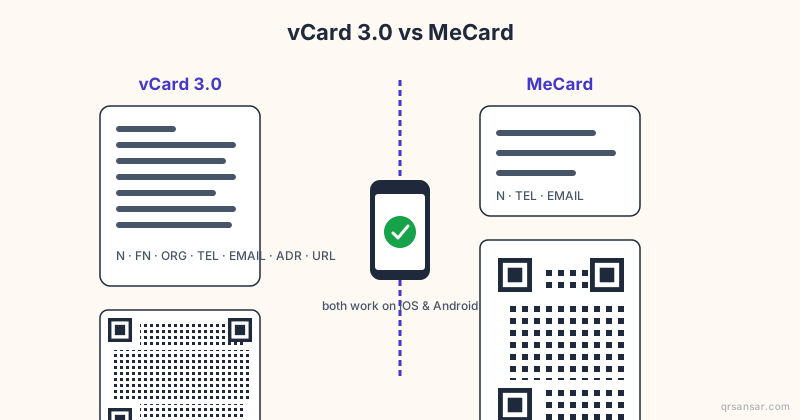
Both are recognised by the native camera apps on iOS and Android. Both produce a clean "Add to Contacts" prompt when scanned. The differences are everything that happens before and after that prompt.
The core technical difference
vCard 3.0 is a multi-line plain-text record. A typical card looks like this:
BEGIN:VCARD
VERSION:3.0
N:Sharma;Anjali;;;
FN:Anjali Sharma
ORG:QRSansar Pvt. Ltd.
TITLE:Product Lead
TEL;TYPE=CELL:+9779800000000
EMAIL:[email protected]
URL:https://qrsansar.com
ADR;TYPE=WORK:;;Thamel;Kathmandu;;44600;Nepal
END:VCARD
That is roughly 220 characters before you add anything optional like a photo, social profile, or note. With a photo embedded as base64, a vCard payload easily crosses 3,000-10,000 characters, which is most of the practical capacity of a QR code at error-correction level M.
MeCard is one line:
MECARD:N:Sharma,Anjali;TEL:+9779800000000;EMAIL:[email protected];URL:https://qrsansar.com;;
Around 90 characters. It encodes the same essential contact data in roughly 40 percent of the bytes, and produces a much sparser QR code that prints smaller and scans faster from a distance.
A QR code's module count grows as the payload grows. Doubling the payload roughly doubles the visual density. That means MeCard codes can be printed at half the size of a vCard 3.0 with photo, and still scan reliably.
If you care about scanning distance and physical print size, see /blog/qr-code-print-size-scanning-distance-formula for the formula and a worked example.
Field-by-field support
Here is what each format supports, what is well-tested, and what tends to break.
| Field | vCard 3.0 | MeCard | Notes |
|---|---|---|---|
| Full name | FN | N | Both required; MeCard uses N only |
| Structured name (first/last) | N | N | Both support; MeCard via single N field |
| Phone (mobile) | TEL;TYPE=CELL | TEL | Both reliable |
| Phone (work/home) | TEL;TYPE=WORK / HOME | TEL (single only) | vCard wins for multiple numbers |
| Both reliable | |||
| Multiple emails | Yes | Practically no | vCard wins |
| Organization | ORG | ORG | Both reliable |
| Job title | TITLE | Not supported | vCard only |
| URL / website | URL | URL | Both reliable |
| Postal address | ADR (structured) | ADR (single string) | vCard structures it; MeCard concatenates |
| Photo (embedded) | PHOTO;ENCODING=b | Not supported | vCard 3.0 only |
| Photo (URL reference) | PHOTO;VALUE=URI | Not supported | vCard only |
| Birthday | BDAY | BDAY | Both support; iOS varies |
| Note | NOTE | NOTE | Both reliable |
| Social profiles | X-SOCIALPROFILE / IMPP | Not supported | vCard only; iOS recognises some |
| LinkedIn URL | URL or X-SOCIALPROFILE | URL field | Use URL field for both |
| Gender | GENDER (vCard 4.0) | Not supported | vCard 4.0 only |
| Multiple addresses | Yes | No | vCard wins |
The clear pattern: MeCard is for the contact data anyone could need, and vCard is for everything else as well. If you only need name, phone, email, and a URL, MeCard does the job at a fraction of the bytes. The moment you want a job title, multiple numbers, a structured address, or a photo, you need vCard 3.0.
How iOS and Android handle each
Both Apple and Google have built native QR scanning into the camera app, so neither format requires a third-party reader for years now. There are small differences worth knowing.
iOS (Camera app and Code Scanner)
- vCard 3.0: Camera shows a "Contact" banner. Tapping opens a preview with all fields parsed; the user taps "Add to Contacts" or "Create New Contact". Embedded photos appear in the preview.
- MeCard: Same flow. Preview shows fewer fields, naturally. iOS sometimes renders the name slightly differently (showing the literal
Nvalue rather than splitting first/last cleanly) when the MeCardNis not comma-separated correctly.
Android (Google Lens and Google Camera)
- vCard 3.0: Lens shows a contact card with parsed fields and an "Add contact" button.
- MeCard: Same flow. Older Android versions (pre-12) occasionally treat MeCard as a plain text result on certain OEM skins. Newer versions handle it natively.
Practical takeaway: in 2026, both formats work on both platforms. If you are designing for a global audience where some users might still be on older phones, vCard 3.0 has the broadest historical support. If you are designing for a tech-savvy audience and care about a clean, fast-scanning code, MeCard is excellent.
Choosing the error-correction level
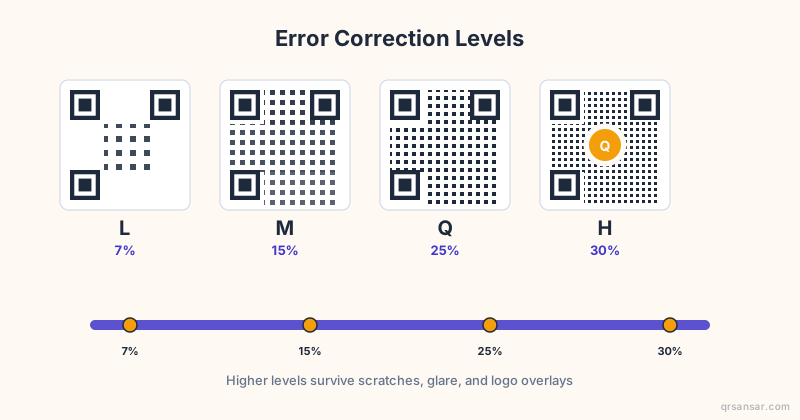
Both formats benefit from the right error-correction level. Higher levels add redundancy and tolerate more damage, but they also push the module count up.
- For digital business cards on glossy stock that will survive in wallets, M (15 percent recovery) is the sweet spot.
- For embroidered name patches, t-shirts, or vinyl decals, go to Q or H.
- For email signatures and email-only contact codes, L is fine.
The deep dive is at /blog/error-correction-levels-l-m-q-h-explained.
When MeCard wins
Pick MeCard if any of these apply:
- The QR has to be printed at a small physical size (under 2 cm), for example on a name sticker, lanyard tag, or table tent.
- The code needs to scan reliably from across a room.
- You only need name, one phone number, one email, and a URL.
- You are printing thousands of them and want the smallest module count for the cleanest, cheapest print.
- The QR is going on a thermal printer, label printer, or low-quality output where every module of margin matters.
A typical MeCard for a conference attendee badge produces a QR code at version 4-5 (33x33 to 37x37 modules), which prints crisply at 2-3 cm and scans from a metre away without effort.
When vCard 3.0 wins
Pick vCard 3.0 if any of these apply:
- You want to include a photo so recipients can match a face to the contact later.
- You have multiple phone numbers, addresses, or emails to convey.
- The contact has a formal job title and organisation that matters for context.
- You want social profile links to flow into the recipient's contact entry.
- The card is going on premium business-card stock at 4 cm or larger.
- You are printing a corporate executive card where completeness beats minimalism.
A vCard 3.0 with a small (96x96 px JPEG) photo produces a QR at version 15-20 (77x77 to 97x97 modules). That needs at least 4 cm of print width to scan reliably, and ideally 5 cm.
What about vCard 4.0?
vCard 4.0, defined in RFC 6350, is the modern successor to 3.0. It supports more structured fields (GENDER, KIND, RELATED, multiple language tags), a cleaner property syntax, and explicit handling of group contacts. The catch in 2026 is that app support is still uneven. iOS Contacts parses vCard 4.0 but occasionally normalises it back to 3.0 syntax. Some Android OEM contact apps treat unfamiliar 4.0 properties as plain text and drop them.
The practical recommendation: stick with vCard 3.0 for QR distribution. Use vCard 4.0 only when both sides of the exchange are known to support it (server-to-server sync, mature CardDAV clients). The QRSansar vCard tool defaults to 3.0 for exactly this reason.
A worked example: which format for which job?
- Conference attendee badge (printed at 2 cm on cardstock): MeCard. Smaller code, faster scan, no photo needed.
- Executive business card (printed at 4 cm with company branding): vCard 3.0 with photo. Premium feel, full contact richness.
- Restaurant staff name tag (printed at 1.5 cm on a plastic clip): MeCard. Distance scanning, minimal density.
- Real estate agent yard sign (printed at 10 cm): vCard 3.0 with multiple phone numbers and an address. The print is large enough that density does not matter.
- Trade-show booth QR card (printed at 5 cm and re-used by 6 staff members): bulk-generated vCard 3.0 with photo, one per staff member. The /bulk workflow handles this in one CSV.
- Email signature in HTML: either works; vCard 3.0 is slightly more universal.
Common mistakes
A few things people get wrong, regardless of format choice.
- Forgetting the country code on phone numbers. Always use
+977...(or your country's equivalent) inTEL. Domestic-only numbers will fail when scanned abroad. - Wrapping vCard lines incorrectly. vCard 3.0 specifies a maximum line length of 75 octets with continuation rules. Most generators handle this for you, but if you are hand-rolling, do not split mid-multi-byte character.
- Embedding a 2 MB photo. The QR will refuse to encode it. Keep embedded photos under 5 KB after base64 (so under 4 KB raw). 96x96 px JPEG at 70 percent quality is plenty.
- Using a third-party shortener inside a vCard URL field. The shortener can disappear or be retargeted years later. Always link directly to a domain you control.
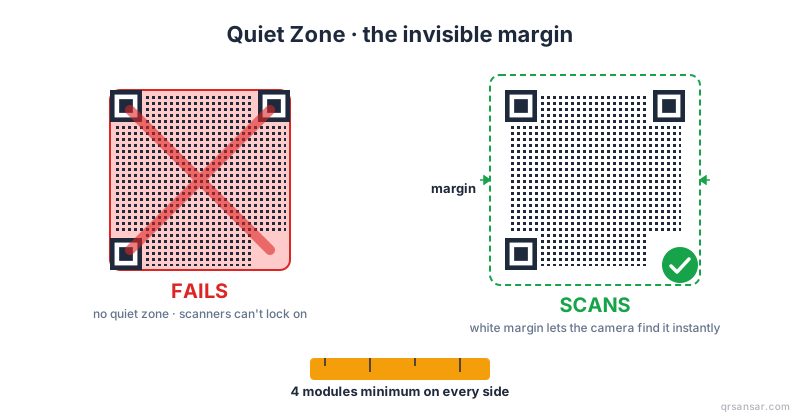
- Skipping the quiet zone. Both formats need at least 4 modules of white padding. The denser the code (vCard with photo), the more critical this is.
The short version
| Question | Answer |
|---|---|
| Smallest, fastest-scanning code? | MeCard |
| Richest contact preview? | vCard 3.0 |
| Photo support? | vCard 3.0 only |
| Multiple phones / addresses? | vCard 3.0 |
| Conference badges and stickers? | MeCard |
| Premium executive cards? | vCard 3.0 |
| Universal device support? | Both, vCard 3.0 slightly broader |
| Future-proof? | vCard 3.0 today; vCard 4.0 in 2-3 years |
Both formats are tools. The question is not "which is better" but "which fits the print size and contact richness I need?" For most small businesses in 2026, the answer is: vCard 3.0 for the executive's card, MeCard for everything else.
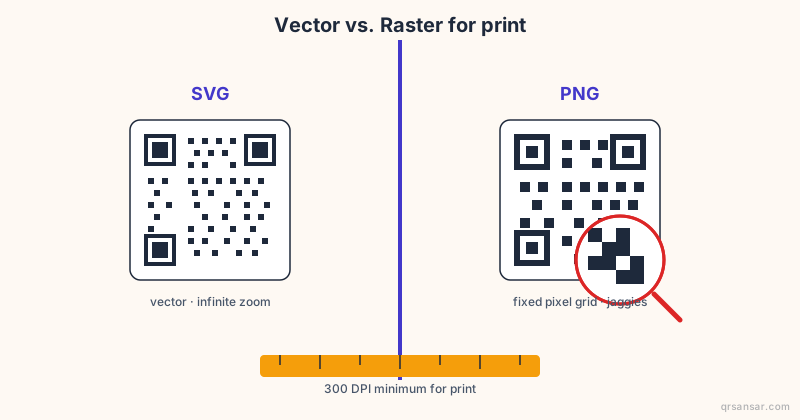
Build your contact QR at /vcard. The generator switches between vCard 3.0 and MeCard in one click, and exports SVG for crisp printing at any size.